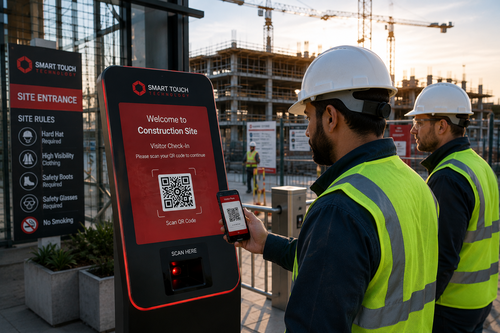
Front desks in Singapore offices, factories, and commercial buildings are under constant pressure to check visitors in quickly while still keeping an accurate record of who is on-site. A commercial visitor management system kiosk solves this by letting guests register themselves at a self-service screen, cutting down queues and giving building management a reliable digital log of every visit.
What Is a Commercial Visitor Management System Kiosk?
A visitor management system kiosk is a self-service touchscreen station placed at a building entrance or reception area. Visitors enter their details, take a photo if required, and receive a printed or digital pass, all without needing a staff member to manually log the visit.
Most kiosks are designed to be intuitive enough for first-time visitors to use without instructions, with clear on-screen prompts guiding them through each step of the check-in process.
Why Commercial Sites Are Adopting Kiosks
Busy commercial buildings often see waves of visitors arriving around the same time for meetings, deliveries, or maintenance work. A kiosk absorbs this traffic without adding to reception staff workload, while still capturing the same details a manual sign-in book would require.
Handling Delivery and Contractor Traffic
Commercial buildings do not only receive business visitors. Couriers, delivery drivers, and maintenance contractors often make up a large share of daily foot traffic. A kiosk can offer a separate, simplified check-in flow for these groups, capturing just the details needed, such as company name and purpose of visit, without slowing them down with unnecessary fields.
Supporting Multi-Tenant Buildings
In buildings with several tenant companies, a shared kiosk in the main lobby can route visitors to the correct floor or department based on who they are meeting. This avoids the confusion that can happen when visitors are unsure which reception desk to approach, and it gives building management a single, consistent visitor record across all tenants.
How the Kiosk Process Works
Self-Service Check-In
Visitors approach the kiosk, select the host or department they are visiting, and enter basic details such as name and contact number. Some setups also scan an identity document to speed up data entry.
Host Notification
Once check-in is complete, the system can automatically notify the host employee that their visitor has arrived, removing the need for reception to make a phone call or send a message manually.
This is particularly useful in larger offices where the host may be on a different floor or in a meeting room away from reception, since a mobile alert reaches them wherever they are.
Pass Issuance and Checkout
The kiosk prints or displays a visitor pass, which may include a photo and expiry time. When the visit ends, visitors can check out at the same kiosk, closing the record for that visit.
Closing the loop on checkout also gives facility teams an accurate real-time count of how many visitors are currently in the building, which can be useful for evacuation planning as well as day-to-day capacity management.
Key Benefits of a Visitor Management System Kiosk
| Benefit | Why It Matters |
|---|---|
| Reduced reception workload | Visitors register themselves without staff assistance |
| Digital visitor logs | Replaces paper sign-in books with searchable records |
| Faster check-in during peak times | Multiple visitors can register in parallel |
| Automatic host notification | Hosts are alerted as soon as a visitor arrives |
| Consistent data capture | Every visitor record follows the same format |
Best Practices for Deploying a Visitor Kiosk
Step-by-Step Deployment
- Choose a visible entrance location: Place the kiosk where arriving visitors will naturally see it.
- Define the data fields to capture: Decide what information is required for compliance or security purposes before configuring the kiosk.
- Set up host notification channels: Connect the system to email, SMS, or messaging apps used by staff.
- Run a short pilot at the main entrance: Test the flow with real visitors before rolling out to additional entrances.
- Review visitor logs periodically: Use the digital records to spot unusual visit patterns or repeated no-shows.
Feature Comparison: Manual Sign-In vs Visitor Management Kiosk
| Feature | Manual Sign-In Book | Visitor Management Kiosk |
|---|---|---|
| Check-in speed | Slower, one visitor at a time with staff assistance | Faster, multiple kiosks can run in parallel |
| Data accuracy | Handwriting can be unclear or incomplete | Digital entry ensures consistent, legible records |
| Host notification | Manual phone call or walk-over | Automatic alert on arrival |
| Record retrieval | Manual search through paper logs | Searchable digital history |
Key Takeaways
- A commercial visitor management system kiosk speeds up check-in while reducing reception workload.
- Digital visitor logs are easier to search and review than paper sign-in books.
- Automatic host notifications remove a manual step from the visitor arrival process.
- A short pilot at the main entrance helps confirm the setup before wider rollout.
Frequently Asked Questions
Can the kiosk handle large volumes of visitors during peak hours?
Yes, self-service kiosks are designed to let multiple visitors check in at the same time, which helps during busy periods such as morning arrivals or large meetings.
Is visitor data stored securely?
Reputable systems store visitor data in encrypted form and allow administrators to control who can access the records, in line with standard data protection practices.
Can the kiosk print a visitor badge automatically?
Most commercial kiosks include an integrated printer that issues a badge immediately after check-in, often including a photo and visit expiry time.
What happens if a visitor forgets to check out?
Many systems allow administrators to set an automatic checkout time or flag overdue visits for manual review, so the log stays accurate.
Can the kiosk integrate with existing access control systems?
Many visitor management kiosks are designed to work alongside existing access control platforms, allowing a visitor pass to also grant temporary building access where needed.
Conclusion
A commercial visitor management system kiosk gives Singapore businesses a practical way to modernise front-desk operations without adding extra staff. By moving check-in to a self-service screen, building management gains faster processing, more accurate records, and automatic host notifications, all while giving visitors a smoother arrival experience. For commercial sites looking to reduce reception bottlenecks, a visitor kiosk is a straightforward upgrade worth considering.
Explore full product details by clicking here: https://smartouch.com.sg/vms-visitor-management-system/
Smart Touch technology pte ltd , www.smartouch.com.sg +65-63964767, sales@smartouch.com.sg , www.smartouch.com.my +607-3889903 sales@smartouch.com.my