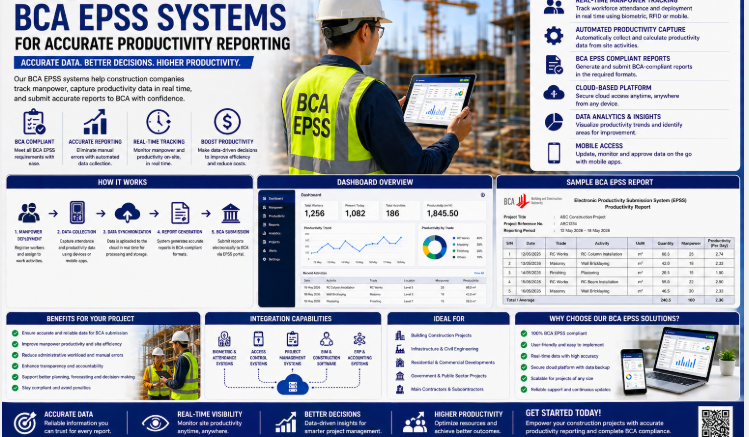
Automated EPSS Submission Software for Singapore
Automated EPSS submission software for Singapore helps construction companies turn daily workforce records into accurate, timely productivity submissions. Instead of collecting attendance from multiple files and manually re-entering figures, project teams can capture verified site activity, validate records and prepare reports through one controlled workflow.
For main contractors and subcontractors, reliable reporting affects compliance, payroll accuracy, deployment visibility and management decisions. This guide explains how automated EPSS software works, which features matter and how contractors can implement it successfully.
What Is Automated EPSS Submission Software?
EPSS software centralises attendance, worker identity, trade information, project assignments and submission-ready records. It receives data from biometric terminals, facial recognition devices, turnstiles or mobile tools, then applies validation rules before reports are prepared.
The aim is to reduce fragmented processes while maintaining a clear audit trail. Authorised users can review exceptions, correct supported data and monitor submission status without uncontrolled spreadsheets.
Why Singapore Contractors Need Automated EPSS Software
Accurate workforce verification
Biometric or facial verification connects each record to an enrolled worker. This reduces duplicate entries, proxy attendance and errors caused by handwritten logs.
Faster submission preparation
Automation organises data by project, employer, trade and reporting period. Teams spend less time consolidating records and more time reviewing genuine exceptions.
Real-time site visibility
Dashboards show who entered, which subcontractors are active and how deployment changes during the day. Management can compare planned and actual manpower quickly.
Consistent audit records
Every approved adjustment should record the user, time and reason. A structured audit trail supports internal reviews and makes questions easier to resolve.
Core Features to Evaluate
| Feature | Business value |
|---|---|
| Biometric attendance integration | Creates verified entry and exit records |
| Worker and trade profiles | Organises deployment information consistently |
| Automated validation | Flags missing, duplicate or unusual records |
| Submission workflow | Supports review, approval and tracking |
| Multi-project dashboard | Gives head office central visibility |
| Role-based permissions | Limits access to authorised responsibilities |
| Exportable reports | Supports compliance and management analysis |
| Audit logs | Records changes and approvals |
How the Automated Workflow Operates
- Enrol workers. Create verified profiles with project, employer and trade details.
- Capture attendance. Record entry and exit through approved devices.
- Synchronise data. Transfer records to the central platform securely.
- Validate exceptions. Flag missing punches, duplicates and unassigned workers.
- Review and approve. Let authorised personnel resolve supported exceptions.
- Prepare reports. Generate the required period and project records.
- Track submission. Maintain status, history and evidence for follow-up.
Automation Versus Manual Reporting
| Area | Manual method | Automated EPSS software |
|---|---|---|
| Data collection | Separate files and logs | Central verified records |
| Error checking | Individual review | Rules flag exceptions |
| Visibility | Delayed summaries | Near real-time dashboards |
| Approvals | Email follow-up | Controlled workflow |
| Audit trail | Difficult to reconstruct | Time-stamped history |
Best Practices for Implementation
Map responsibilities first
Define who enrols workers, reviews exceptions, approves changes and completes submissions. Clear ownership prevents unresolved records from accumulating.
Standardise project data
Use consistent project codes, subcontractor names and trade categories. Clean master data is essential for reliable reports.
Test devices under site conditions
Evaluate lighting, dust, network coverage, queue volume and worker movement. Hardware placement can be as important as software capability.
Train subcontractors and supervisors
Explain the attendance process, exception rules and cut-off times. A short practical workflow is easier to follow than a complex manual.
Monitor data quality daily
Review missing exits, unknown workers and offline devices before the reporting deadline. Early correction reduces pressure at submission time.
Security and Governance
Construction workforce systems contain personal and operational information. Organisations should use role-based permissions, secure connections, documented retention periods and controlled administrator access. Biometric templates require appropriate technical and organisational protection.
Backups, availability monitoring and recovery procedures also matter. Ask vendors how records are protected, how devices reconnect after outages and how changes are logged.
Key Benefits
- Less manual consolidation and duplicate entry
- More accurate attendance and deployment records
- Faster exception review and submission preparation
- Improved visibility across projects and subcontractors
- Clearer audit trails and accountability
- Better workforce planning based on reliable data
Frequently Asked Questions
Can EPSS software support multiple projects?
Yes. A central platform can separate permissions and reports by project while giving authorised head-office users a consolidated view.
Can it connect to facial recognition turnstiles?
Yes, when hardware and software interfaces are compatible. The complete integration should be tested before deployment.
What happens when a device goes offline?
Suitable devices store records temporarily and synchronise after reconnection. Exact offline capability depends on the selected hardware.
Does automation remove human review?
No. It reduces repetitive work and highlights exceptions, while authorised personnel remain responsible for reviewing records.
How should contractors begin?
Start with one project, confirm master data, test peak entry periods and refine exception handling before expanding.
Conclusion
Automated EPSS submission software for Singapore gives contractors a dependable path from verified site attendance to controlled productivity reporting. By centralising data, flagging exceptions and documenting approvals, it saves administrative time while strengthening visibility and accountability. The best results combine suitable technology with clean data, clear responsibilities and daily quality checks.
For a complete breakdown of features and modules, visit our product page here: https://smartouch.com.sg/bca-bas-epss-solution/
Smart Touch technology pte ltd , www.smartouch.com.sg +65-63964767, sales@smartouch.com.sg , www.smartouch.com.my +607-3889903 sales@smartouch.com.my