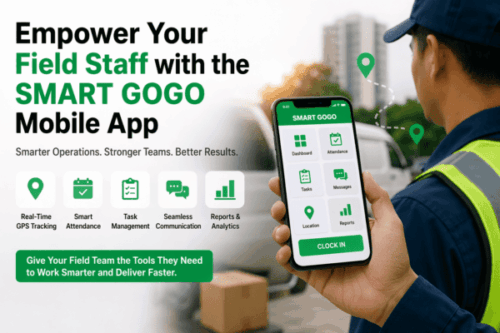
#1 Mobile Clock In App Singapore with Geofencing
A mobile clock in app Singapore businesses can use with geofencing gives managers accurate attendance visibility without depending on a fixed terminal. Employees clock in from an authorised smartphone, while location rules help confirm that the action occurs at the approved office, project site or customer location.
For field services, construction, maintenance, sales and hybrid teams, traditional attendance methods often create delays and disputes. A well-designed mobile solution combines convenience with clear controls, real-time records and useful management reports.
What Is a Mobile Clock In App with Geofencing?
A mobile clock-in app records attendance through an employee’s phone. Geofencing creates a virtual boundary around an approved location using geographic coordinates and a defined radius. When an employee attempts to clock in or out, the system checks whether the device is inside the authorised zone.
The app may also capture time, location status, device details, a photo, job code and employee notes. Supervisors review exceptions through a central web dashboard.
Why Singapore Businesses Need Mobile Attendance
Support distributed teams
Employees may start work at customer sites, warehouses or temporary projects. Mobile attendance removes unnecessary travel to a central terminal.
Improve payroll accuracy
Digital time records reduce handwritten mistakes and late timesheet submissions. Approved hours can flow into attendance and payroll processes.
Reduce time theft
Geofencing discourages clock-ins from unapproved locations. Combined with identity controls and audit logs, it creates a more accountable workflow.
Give managers real-time visibility
Supervisors can see who has started work, who is late and which records need review without waiting for end-of-week forms.
Key Features of the Best Mobile Clock In App Singapore
| Feature | Benefit |
|---|---|
| Configurable geofences | Defines approved attendance zones |
| GPS status capture | Records location validation with each action |
| Photo or facial verification | Strengthens employee identity checks |
| Shift scheduling | Connects attendance with planned work |
| Offline mode | Supports sites with temporary poor coverage |
| Exception workflow | Lets supervisors review legitimate issues |
| Leave and claims tools | Combines common workforce tasks |
| Payroll export | Reduces duplicate data entry |
How Geofencing Works
- An administrator registers an approved worksite and radius.
- The employee signs in to the authorised mobile account.
- The app requests location status when attendance is submitted.
- The platform checks the device position against the geofence.
- An in-zone record is accepted according to policy.
- An out-of-zone attempt is blocked or routed for review.
- The action and any approval are stored in the audit trail.
Geofencing Versus Traditional Attendance
| Area | Fixed terminal | Mobile geofencing |
|---|---|---|
| Best location | Permanent workplace | Multiple or changing sites |
| Hardware | Dedicated device | Authorised smartphone |
| Deployment | Installation at each entrance | App and site configuration |
| Visibility | Central site records | Real-time distributed records |
| Exceptions | Manual supervisor correction | Digital approval workflow |
Implementation Best Practices
Define clear policies
Tell employees when location is checked, what data is collected and how attendance exceptions are handled. Transparency improves adoption.
Use practical geofence sizes
A boundary that is too small may reject legitimate users because GPS accuracy varies. A boundary that is too wide weakens control. Test every location.
Plan for poor connectivity
Some basements and worksites have unstable service. Confirm how offline records are stored, time-stamped and synchronised.
Protect employee accounts
Use strong authentication, device controls and role-based administrator access. Review unusual devices or repeated failed attempts.
Train supervisors on exceptions
Managers should know how to handle approved off-site work, emergency reassignment and location errors without bypassing the audit trail.
Key Benefits
- Faster attendance for remote and field teams
- Fewer manual timesheets and payroll corrections
- Location-aware accountability
- Immediate supervisor dashboards
- Scalable setup for multiple sites
- Documented exception approvals
- Better workforce planning data
Choosing the Right Mobile Clock-In App
Evaluate the complete workflow, not only the clock-in screen. Test employee enrolment, shift assignment, geofence accuracy, offline use, supervisor approval, payroll export and reporting. Confirm compatibility with common employee devices and understand battery and permission requirements.
Local support also matters. Ask how quickly the vendor responds, how software updates are managed and whether administrators receive practical training.
Frequently Asked Questions
Does geofencing track employees all day?
It does not have to. A properly configured system can check location only during an attendance action. Organisations should communicate their actual configuration.
Can employees clock in without internet?
Some applications support controlled offline records that synchronise later. The feature and safeguards should be verified.
Can one employee belong to several sites?
Yes. Administrators can assign multiple approved locations according to role and schedule.
What if GPS is inaccurate?
The app should provide an exception process. Organisations can also adjust geofence radius after testing site conditions.
Can attendance data connect to payroll?
Many platforms offer exports or integrations that transfer approved hours to payroll software.
Conclusion
A mobile clock in app Singapore employers deploy with geofencing creates a flexible attendance process for modern distributed teams. It reduces manual reporting, improves payroll inputs and gives supervisors faster visibility while keeping location checks tied to clear workplace rules. With practical geofences, strong account security and a fair exception process, businesses can improve accountability without making attendance difficult.
Interested in this product? Click here to learn more: https://smartouch.com.sg/smartgogo/
Smart Touch technology pte ltd , www.smartouch.com.sg +65-63964767, sales@smartouch.com.sg , www.smartouch.com.my +607-3889903 sales@smartouch.com.my