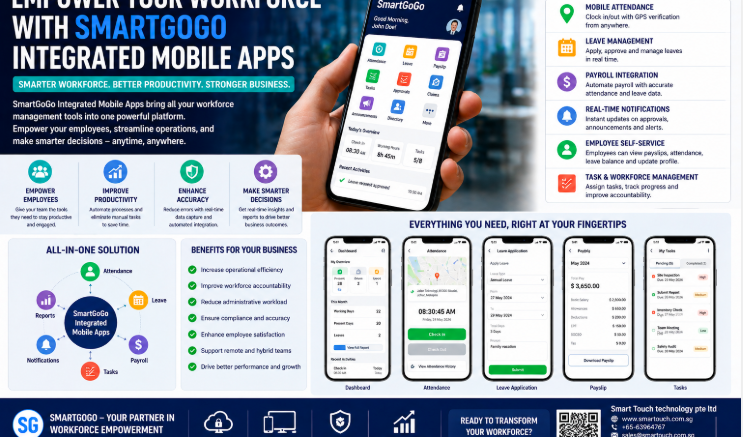
Fixed biometric terminals work well at a single site entrance, but many construction projects involve workers moving between multiple locations, remote sites, or areas without stable power. A mobile clock-in app gives construction site managers a flexible way to capture attendance directly from a smartphone, without relying on a permanently installed terminal. This article explains how a mobile clock-in app works, why it suits Singapore’s construction sites, and what features to look for when choosing one.
Why Construction Sites Need a Mobile Clock-In App
Not every work location has a fixed entry point where a biometric terminal makes sense. Site supervisors, mobile teams, and workers on smaller or temporary sites still need an accurate way to record attendance that feeds into payroll and BCA ePSS reporting.
Limitations of Fixed Terminals Alone
Installing a biometric terminal at every temporary or satellite location isn’t always practical. A mobile clock-in app fills this gap, allowing supervisors to record attendance for smaller teams or short-term deployments without additional hardware.
How a Mobile Clock-In App Works
GPS-Verified Check-In
Workers check in and out through a mobile app, with GPS location captured alongside the timestamp to confirm attendance was logged from the correct site.
Photo Verification
Some mobile clock-in apps require a photo at check-in, adding a layer of verification similar to facial recognition without needing a fixed terminal.
Real-Time Sync With HR and Payroll
Attendance data recorded through the app syncs directly with HR and payroll systems, so man-hours are calculated automatically without manual data entry.
Key Benefits of a Mobile Clock-In App for Construction Sites
| Benefit | Why It Matters |
|---|---|
| Flexible deployment | No fixed hardware needed at every site or checkpoint |
| GPS verification | Confirms attendance was logged from the correct location |
| Faster onboarding | New sites can start tracking attendance immediately via the app |
| Payroll integration | Attendance data flows directly into payroll calculations |
| Lower hardware costs | Reduces the need for multiple fixed biometric terminals |
Mobile Clock-In App vs. Fixed Biometric Terminal
| Factor | Fixed Biometric Terminal | Mobile Clock-In App |
|---|---|---|
| Deployment | Requires installation at each site | Works instantly on any smartphone |
| Best suited for | Permanent, high-traffic entry points | Temporary sites, mobile teams, small crews |
| Location verification | Fixed by terminal placement | GPS-based, confirms check-in location |
| Hardware cost | Higher, per terminal | Lower, uses existing smartphones |
| Identity verification | Fingerprint or facial recognition | Photo capture or app login |
Best Practices for Rolling Out a Mobile Clock-In App
- Ensure all site supervisors and workers have the app installed and tested before go-live
- Set GPS geofencing boundaries to prevent check-ins from outside the work site
- Sync attendance data with payroll and BCA ePSS reporting to avoid duplicate manual entry
- Use photo verification for sites where identity confirmation is a priority
- Train supervisors on how to review and correct attendance records where needed
Key Takeaways
A mobile clock-in app extends accurate attendance tracking to construction sites and teams that don’t have a fixed biometric terminal, using GPS and photo verification to confirm who checked in and where. It’s a practical complement to fixed biometric systems rather than a full replacement for high-traffic entry points.
Conclusion
Construction projects rarely operate from a single fixed location, and attendance tracking needs to keep up with that reality. A mobile clock-in app gives site managers a flexible, GPS-verified way to record attendance across multiple locations, feeding directly into payroll and compliance reporting. Smart Touch’s SmartGoGo mobile app is designed to work alongside fixed biometric systems, giving construction businesses a complete attendance solution regardless of site setup.
Frequently Asked Questions
What is a mobile clock-in app?
It’s a smartphone application that lets workers check in and out of a work site, using GPS and sometimes photo verification to confirm attendance.
Is a mobile clock-in app as accurate as a biometric terminal?
It uses different verification methods — GPS location and photo capture — and works well as a flexible option for sites without fixed terminals, complementing biometric systems rather than replacing them entirely.
Can it integrate with payroll systems?
Yes. Attendance data recorded through the app typically syncs with HR and payroll platforms to automate man-hour calculations.
Is it suitable for temporary or short-term construction sites?
Yes. Since it doesn’t require fixed hardware installation, a mobile clock-in app is well suited to temporary sites, satellite locations, and small crews.
Interested in this product? Click here to learn more: https://smartouch.com.sg/smartgogo/
Smart Touch technology pte ltd , www.smartouch.com.sg +65-63964767, sales@smartouch.com.sg , www.smartouch.com.my +607-3889903 sales@smartouch.com.my