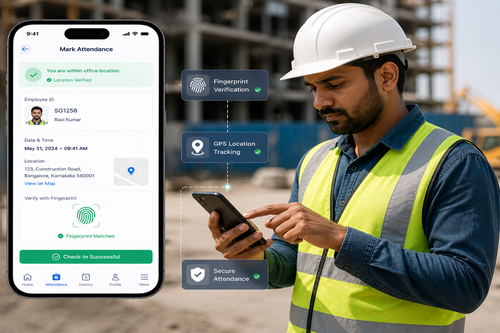
Shift Management via Mobile Clock In App Singapore
Managing shift workers across multiple sites is a constant challenge for HR and operations teams in Singapore. A mobile clock in app for shift management gives employees a simple way to check in and out from their phones, while giving managers real-time visibility into attendance across every location without relying on fixed hardware terminals.
This article explains how mobile clock in apps support shift management, the benefits for multi-site businesses, and what features to look for when choosing a solution.
Why Businesses Are Moving to Mobile Clock In
Traditional fixed biometric terminals work well for a single location, but many Singapore businesses operate across multiple sites, retail outlets, or mobile teams that do not have a fixed workstation. A mobile clock in app solves this by letting employees log attendance directly from their smartphone, often with GPS verification to confirm they are at the correct location.
This is especially useful for industries like retail, cleaning services, security, and field sales, where staff move between locations regularly and a fixed terminal is impractical.
Core Features of a Mobile Clock In App
GPS-Verified Check-In
Location verification ensures employees are physically at the assigned site when clocking in, reducing time fraud.
Shift Scheduling
Managers can create and adjust shift schedules directly in the app, with employees receiving instant notifications of changes.
Real-Time Attendance Dashboard
Supervisors can see who has clocked in, who is late, and who is absent across all sites from a single dashboard.
Benefits of Mobile Clock In for Shift Management
| Benefit | Description |
|---|---|
| Location Flexibility | Employees can clock in from any assigned site without fixed hardware. |
| Reduced Time Fraud | GPS verification confirms employees are at the correct location. |
| Real-Time Visibility | Managers see attendance status across sites instantly. |
| Simplified Payroll | Accurate clock-in data reduces payroll disputes and manual reconciliation. |
| Faster Schedule Changes | Shift updates reach employees instantly through the app. |
Best Practices for Rolling Out a Mobile Clock In App
- Communicate the change clearly – explain how location data is used and stored.
- Start with a pilot site – test the app with one team before wider rollout.
- Set clear geofence boundaries – define acceptable check-in radius for each site.
- Integrate with payroll systems – reduce manual data entry between attendance and payroll.
- Monitor adoption – follow up with staff who are not using the app correctly.
Mobile Clock In vs Fixed Terminal Systems
| Aspect | Fixed Terminal | Mobile Clock In App |
|---|---|---|
| Location Flexibility | Limited to installed site | Works across multiple sites |
| Hardware Cost | Requires physical device per site | Uses employees’ own smartphones |
| Setup Speed | Requires installation and wiring | Deploys quickly via app download |
| Best For | Fixed offices or factories | Retail, field teams, mobile staff |
Is This Suitable for Larger Organisations?
Yes. Many mobile clock in platforms scale to support hundreds or thousands of employees across dozens of sites, with centralised reporting for HR and operations teams. Larger organisations often combine mobile clock in with fixed biometric terminals at headquarters, using the mobile option specifically for field or multi-site staff.
Key Takeaways
- Mobile clock in apps give shift-based and multi-site teams flexible attendance tracking.
- GPS verification helps prevent time fraud without requiring fixed hardware.
- Real-time dashboards simplify shift management and payroll accuracy.
Conclusion
A mobile clock in app gives Singapore businesses a practical way to manage shift-based and multi-site workforces without the cost and rigidity of fixed biometric terminals. By combining GPS-verified check-ins, real-time dashboards, and shift scheduling in one platform, HR and operations teams gain better visibility and fewer payroll disputes. For businesses with distributed or mobile teams, this approach is often more practical and cost-effective than traditional fixed attendance systems.
Frequently Asked Questions
Does the app work without internet access?
Most apps support offline check-ins, syncing data automatically once connectivity is restored.
Can employees clock in from anywhere?
No, GPS geofencing restricts check-ins to approved locations set by the employer.
Is this suitable for small businesses?
Yes, mobile clock in apps scale from small teams to large multi-site organisations.
Can shift schedules be changed on short notice?
Yes, managers can update schedules in the app and employees are notified instantly.
Does this integrate with payroll systems?
Most platforms support integration or data export to common payroll systems used in Singapore.
Interested in this product? Click here to learn more: https://smartouch.com.sg/smartgogo/
Smart Touch technology pte ltd , www.smartouch.com.sg +65-63964767, sales@smartouch.com.sg , www.smartouch.com.my +607-3889903 sales@smartouch.com.my