School campuses are dynamic environments: hundreds (sometimes thousands) of students moving between gates, corridors, labs, libraries, halls, and staff-only zones—plus daily flows of parents, vendors, and visitors. In that reality, “locking the door” is no longer enough. What schools need is an access control system for school that is designed for real campus behavior: peak-hour surges, multiple entry points, layered permissions, visitor accountability, and emergency readiness.
In this guide, we’ll share how we approach school security the modern way—using door access control, turnstile/gantry options, and smart integrations that make daily operations easier while keeping students and staff protected.
Why Every School Needs an Access Control System (Not Just a Lock)
An access control system is about knowing who is entering, where, and when—and being able to change rules instantly without changing hardware keys. In a school setting, that means:
- Controlling main gates and building entrances
- Preventing unauthorized access to staff rooms, admin offices, labs, server rooms, and storerooms
- Reducing tailgating and “door-holding” risks at busy entrances
- Creating reliable audit trails for investigations and incident reviews
- Supporting fast operational workflows—without turning the school into a fortress
Many school security best-practice resources emphasize that securing exterior doors and key restricted areas is a foundational step in campus safety planning.
The Core Components of a School Door Access Control System
A complete access control system for school typically includes the following building blocks:
1) Credentials: How users prove they’re authorized
Schools commonly use:
- RFID cards / key fobs (fast, familiar, cost-effective)
- PIN codes (useful for small staff-only doors)
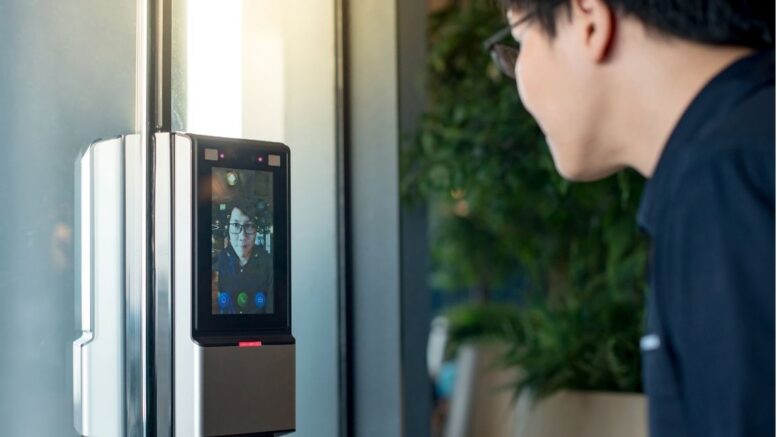
- Biometrics (fingerprint or face recognition) for higher-security doors
- Mobile credentials in some deployments
Modern deployments often combine credential methods—e.g., student RFID + staff biometric—based on risk level and operational needs.
2) Readers and Controllers: The decision-making layer
A reader captures the credential (tap/scan/face), and a controller checks permissions, schedules, and door rules before unlocking.
3) Locks and Door Hardware: The physical enforcement
This can include electric strikes, magnetic locks, or door operators—selected based on door type and traffic frequency.
4) Management Software: Where admins control everything
A proper school-ready platform should support:
- User enrollment and credential issuance
- Time schedules (school hours vs after-hours)
- Door groups and zone permissions
- Real-time logs, alerts, and reports
- Easy revocation (lost card? disable instantly)
Smart Touch solutions emphasize integrated access control approaches that can be combined with other systems and centralized management for operational efficiency.
School-Specific Design: How We Build Access the Right Way
A school is not an office building. The system must match the way students move and the way staff work. Here’s the framework we recommend.
Secure the perimeter first, then layer inward
Start by controlling:
- Main gate(s)
- Lobby/administration entrance
- Visitor entrance
Then apply layered access for: - Classroom blocks
- Staff-only wings
- Specialty rooms (science labs, IT/server rooms)
- Sports halls and equipment rooms
This “layered security” model is widely recommended because it limits how far an unauthorized person can travel even if they reach one point of entry.
Role-based access rules: students, staff, vendors, parents
A school should not rely on one-size-fits-all permissions. We structure permissions by:
- Role (student, teacher, admin, contractor)
- Time (school hours, after-school activities, weekends)
- Location (zones and door groups)
This approach strengthens control while reducing daily friction (teachers don’t need to request access constantly; students don’t “accidentally” enter restricted rooms).
Choosing the Best Authentication for Schools: Cards vs Biometrics vs Face Recognition
RFID cards for students: fast flow, simple management
RFID is usually the best starting point for student movement:
- Low learning curve
- Quick tap-in/out
- Simple replacement process if a card is lost
Biometrics for staff and high-security zones
For staff rooms, finance offices, exam storage, or server rooms, biometrics reduce credential sharing and strengthen accountability.
Face recognition for frictionless access at high-traffic points
Face-enabled access can be ideal for entrances where speed matters and hands-free entry is useful. Smart Touch highlights combined solutions that can include Face Recognition + Door Access + Turnstile Gate / Barrier Gate options.
Turnstiles, Gantries, and Gate Control for School Entrances
Many schools struggle with “open gate” culture—especially during rush periods. This is where entrance channel control systems become valuable.
Depending on layout and student volume, options include:
- Tripod turnstiles for controlled one-by-one entry
- Flap/swing barriers for a smoother student flow
- Full-height turnstiles for higher security perimeters (where appropriate)
- Vehicle barrier gates for parking and staff driveways
When access control is integrated with channel management and monitoring, it becomes much easier to enforce entry rules while keeping movement orderly.
Visitor Management: The Missing Piece in Many Schools
Schools are not only protecting students from unknown entry—they also need accountability for legitimate visitors. A strong access control plan should include:
- Visitor registration (pre-registered or walk-in)
- Temporary credentials (time-limited cards/QR/passes)
- Check-in/check-out timestamps
- Audit history that can be reviewed quickly
Research and local studies frequently highlight how manual visitor logs can be weak and hard to trace during incidents, and why digital visitor management improves accountability.
CCTV, Alarms, and Emergency Readiness: Integrations That Matter
Access control becomes significantly stronger when integrated with:
- CCTV (video verification tied to door events)
- Intrusion alarms (alerts when forced entry occurs)
- Intercoms (front office can verify before unlocking)
These integrations are commonly recommended because they provide both prevention and rapid response capability.
Emergency egress and fire safety considerations
School safety also requires planning for emergencies. For example, some campus policies describe scenarios where fire systems can override or deactivate access control to support safe evacuation.
A professional deployment should always align with local safety requirements, door hardware standards, and evacuation design.
What a “Good” School Access Control System Looks Like Day-to-Day
When the system is designed correctly, schools experience:
- Shorter morning congestion at gates and entrances
- Fewer lost-key incidents (and no costly rekeying)
- Clear logs of entries to sensitive areas
- Cleaner visitor processes (and fewer “walk-through” risks)
- Simple after-hours management for clubs, sports, and events
- Better parent confidence because security is visible and consistent
Implementation Plan: How We Recommend Schools Deploy
Step 1: Map your campus and entry behaviors
We identify:
- High-traffic doors
- “Problem entrances” where tailgating happens
- Areas requiring stronger restrictions (exam storage, admin, IT)
Step 2: Define access policies by role and time
We build the rule set:
- Student zones vs staff zones
- Access schedules
- Temporary access (contractors, events)
Step 3: Select hardware by door type and traffic volume
- Lightweight interior doors need different hardware than perimeter doors
- High-traffic doors should be built for durability and speed
- Entrances may justify turnstiles or barrier solutions depending on risk and flow
Step 4: Integrate where it counts
- CCTV + access events
- Alarm triggers for forced doors
- Visitor workflow and front office control
Step 5: Train and operationalize
The best system is one the school can run confidently:
- Admin training for enrollment and reporting
- Clear SOPs for lost cards, visitor handling, after-hours access, and emergency procedures
Why Schools Choose Smart Touch for Access Control
We focus on building access control systems that fit real campus needs—not generic templates. Our solutions can cover:
- Door access control across classrooms, offices, and restricted zones
- Integrated access control setups that can include channel management and monitoring
- Modern combinations such as Face Recognition + Door Access + Turnstile/Barrier Gate options for comprehensive entry control
When a school wants security that is visible, manageable, and scalable—from a single gate to multiple buildings—we design with long-term operations in mind.
Final Checklist: What to Ask Before Choosing a School Access Control System
Use this checklist to evaluate any vendor or solution:
- Can we manage permissions by role + time + zone?
- Does the system support fast student flow at peak hours?
- Can we issue temporary visitor access and track it?
- Are there audit logs that are easy to search and export?
- Can it integrate with CCTV / alarms / intercoms?
- What is the plan for emergency override / safe egress?
- Is expansion easy if we add more doors, buildings, or campuses?
If your current setup can’t answer “yes” to most of the above, it’s time to upgrade.
Smart Touch technology pte ltd , www.smartouch.com.sg +65-63964767, sales@smartouch.com.sg , www.smartouch.com.my +607-3889903 sales@smartouch.com.my