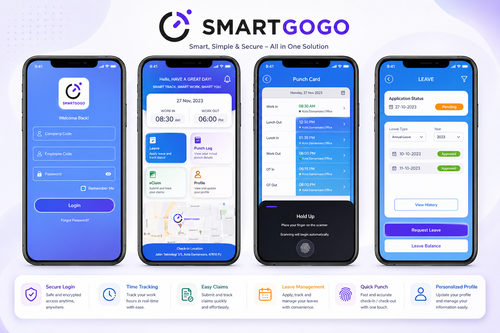
Workforce tracking has become increasingly important for modern businesses in Singapore. Many companies no longer operate with only office-based employees working from one fixed location. Today, businesses manage field workers, technicians, delivery teams, cleaners, security guards, sales staff, construction crews, service workers, hybrid employees, and multi-site teams.
Traditional punch card systems and fixed attendance terminals are often not enough for mobile workforce operations.
The Best Mobile Clock In App Singapore for Workforce Tracking provides businesses with a smarter, more flexible, and more accurate way to manage employee attendance from different locations. Employees can clock in and out using a mobile phone, while HR teams and managers can monitor attendance, working hours, GPS location, overtime, and workforce activity through a centralized cloud system.
At Smart Touch technology pte ltd, our mobile clock in and workforce tracking solutions help Singapore businesses reduce manual timesheets, improve attendance accuracy, support payroll processing, and manage mobile teams more efficiently.
What Is a Mobile Clock In App?
A mobile clock in app is a digital attendance system that allows employees to record working time using a smartphone or mobile device.
Instead of using paper attendance sheets or fixed biometric terminals, employees can clock in and clock out directly through the mobile application.
The system can record:
- Employee identity
- Date and time
- GPS location
- Job site
- Shift schedule
- Attendance status
Advanced systems may also support:
- Selfie verification
- Facial recognition
- QR code attendance
- Geofencing
- Offline mode
- Supervisor approval
- Attendance reports
- Payroll export
For businesses with field workers or multiple work locations, mobile attendance provides better flexibility and visibility.
Why Singapore Businesses Need a Mobile Clock In App
Many Singapore businesses operate across customer sites, offices, shopping malls, industrial areas, warehouses, construction sites, schools, clinics, and remote locations.
When employees work outside a fixed office, attendance tracking becomes more difficult.
Manual attendance methods often create problems such as:
- Inaccurate timesheets
- Late attendance submissions
- Payroll delays
- Missing attendance records
- Difficulty tracking mobile workers
- Manual data entry errors
A mobile clock in app helps solve these issues by allowing employees to submit attendance directly from the field.
Managers can monitor attendance in real time, while HR teams can generate reports more efficiently.
For businesses that value accountability, speed, and accurate workforce tracking, mobile attendance is a practical and future-ready solution.
Benefits of the Best Mobile Clock In App Singapore
Real-Time Workforce Tracking
Managers can instantly monitor:
- Who has clocked in
- Employee locations
- Start and end times
- Late arrivals
- Absences
- Active job sites
This improves manpower visibility and operational response time.
GPS Location Verification
GPS tracking helps verify that employees are clocking in from the correct work location.
This improves accountability and reduces false attendance submissions.
Geofencing Attendance Control
Geofencing creates a virtual attendance boundary around approved work locations.
Employees can only clock in when they are within the allowed area.
This is useful for:
- Cleaning companies
- Security firms
- Construction projects
- Service teams
- Retail outlets
- Logistics operations
Selfie or Facial Verification
Selfie capture or facial recognition helps verify employee identity during attendance submission.
This reduces buddy punching and improves attendance reliability.
Faster Payroll Processing
Digital attendance records help HR process:
- Working hours
- Overtime
- Late deductions
- Public holiday work
- Unpaid leave
more accurately and efficiently.
Reduced Paper Timesheets
Mobile attendance removes the need for manual paper records and spreadsheet tracking.
This reduces administrative workload and improves reporting accuracy.
Better Employee Convenience
Employees can clock in directly from their mobile devices without travelling to a fixed attendance terminal.
This is especially useful for field workers and remote teams.
Improved Manager Control
Managers can review attendance exceptions such as:
- Missing clock-ins
- Wrong location attendance
- Late arrivals
- Overtime requests
This helps improve daily workforce management.
Important Features of a Mobile Clock In App
Mobile Clock-In and Clock-Out
Employees should be able to submit attendance quickly using their smartphones.
GPS Attendance Tracking
GPS verification confirms employee attendance location.
Geofencing Support
Employees can only clock in within approved work zones.
Selfie or Face Verification
Identity verification improves attendance security and accuracy.
Shift and Schedule Management
The system should support:
- Fixed shifts
- Flexible schedules
- Rotating shifts
- Multi-site assignments
Attendance Exception Alerts
Managers should receive alerts for:
- Late attendance
- Missing clock-outs
- Wrong location submissions
- Absences
Offline Attendance Mode
Employees should still be able to record attendance in areas with weak internet connection.
Leave Integration
Approved leave records should automatically sync with attendance data.
Attendance Reports and Payroll Export
The system should generate attendance reports for payroll and HR review.
Employee Self-Service
Employees should be able to check:
- Attendance history
- Work schedules
- Leave balances
- Attendance status
through the app.
Mobile Clock In App for Different Industries
Field Service Teams
Technicians, repair crews, installation teams, and maintenance staff can record attendance directly at customer locations.
Cleaning Companies
Cleaning businesses can verify worker attendance across malls, offices, schools, and public facilities using GPS and geofencing.
Security Companies
Security firms can track guard attendance across multiple locations and shifts more effectively.
Construction Sites
Construction companies can monitor worker attendance across project sites without relying on paper timesheets.
Logistics and Delivery Teams
Delivery staff and logistics teams can record attendance while working across routes and locations.
Retail Businesses
Retail outlets can manage branch attendance and rotating staff schedules more efficiently.
Hybrid Workplaces
Mobile attendance supports flexible work arrangements and hybrid workforce management.
SMEs in Singapore
SMEs can manage attendance without installing multiple physical attendance devices.
How Mobile Attendance Improves Payroll Accuracy
Payroll accuracy depends on reliable attendance records.
A mobile clock in app helps businesses accurately calculate:
- Working hours
- Overtime
- Lateness
- Leave deductions
- Shift allowances
Digital attendance records reduce payroll disputes and improve reporting consistency.
When integrated with payroll or HRMS systems, attendance processing becomes faster and more efficient.
Integration with Cloud Time Attendance Software
A mobile clock in app works best when integrated with cloud-based attendance software.
The mobile app captures attendance data, while the cloud platform manages:
- Attendance records
- Reports
- Shift schedules
- Overtime approval
- Payroll export
This creates a centralized attendance management system for businesses.
Integration with Leave Management and HRMS
Attendance systems should integrate with:
- Leave management
- Payroll software
- Cloud HRMS
- Employee scheduling
- Payslip generation
This creates a complete digital HR workflow and reduces duplicate data entry.
Why Manual Timesheets Are No Longer Enough
Manual attendance tracking creates many operational problems, including:
- Missing records
- Delayed submissions
- Human error
- Difficult verification
- Slow payroll preparation
For mobile and field teams, manual attendance becomes even harder to manage.
A mobile clock in app provides a more transparent, accurate, and scalable solution for modern workforce management.
Choosing the Best Mobile Clock In App Singapore
Businesses should choose a solution that is:
- Easy to use
- Secure
- Reliable
- Scalable
- Cloud-based
- GPS-enabled
Important considerations include:
- Workforce type
- Number of locations
- Attendance rules
- Payroll integration
- Geofencing requirements
- Shift management
- Reporting needs
The right system should simplify attendance tracking while improving operational control.
Why Choose Smart Touch Technology Pte Ltd
Smart Touch technology pte ltd provides mobile attendance, cloud HRMS, payroll, biometric access control, visitor management, turnstiles, guard patrol, and smart workplace solutions for organizations in Singapore and Malaysia.
Our mobile clock in solutions support:
- GPS attendance
- Geofencing
- Facial verification
- Mobile clock-in
- QR code attendance
- Shift management
- Payroll integration
- Multi-site monitoring
We understand that every business has different workforce management needs, and our solutions can be customized to fit different industries and operations.
Build a Smarter Workforce Tracking System
The Best Mobile Clock In App Singapore for Workforce Tracking is more than a digital attendance tool. It is a complete workforce management solution that helps businesses track attendance, verify employee locations, improve payroll accuracy, reduce paperwork, and manage mobile teams more effectively.
For field service companies, cleaning businesses, security providers, construction firms, logistics operators, retail chains, SMEs, and hybrid workplaces, mobile attendance provides the flexibility and visibility needed for modern workforce management.
As businesses in Singapore continue to digitalize operations, mobile clock in technology will become an essential tool for creating a smarter, more efficient, and more transparent workplace.
For more information about the product, please click here: https://smartouch.com.sg/smartgogo/
Smart Touch technology pte ltd, www.smartouch.com.sg, +65-63964767, sales@smartouch.com.sg, www.smartouch.com.my, +607-3889903, sales@smartouch.com.my