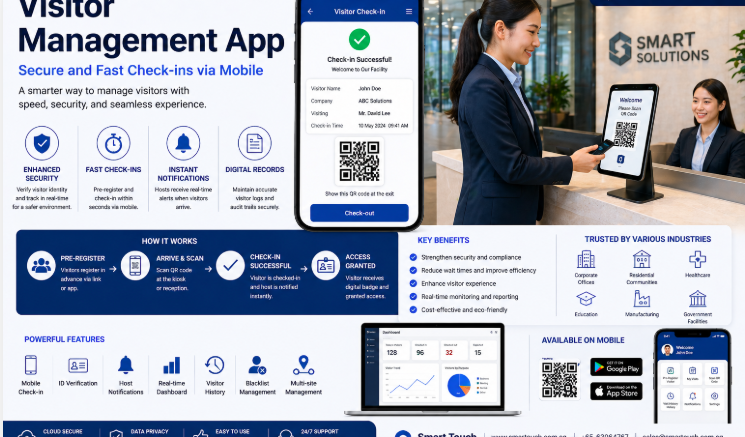
A self-service kiosk is often the first thing a visitor interacts with when arriving at a modern office, making it a critical piece of both the visitor experience and building security. Choosing the best visitor management system kiosk in Singapore means balancing ease of use for guests with strong verification and security features for the building. This guide covers what to look for in a VMS kiosk, key features for 2026, and how it fits into a broader office security strategy.
What Is a Visitor Management System Kiosk?
A VMS kiosk is a self-service terminal, usually placed at reception, where visitors check themselves in — entering their details, having their ID scanned, or confirming a pre-registered appointment — without needing a staff member to manually process each guest.
Why Kiosks Matter for Modern Office Security
Kiosks reduce reliance on front-desk staff to manually verify every visitor, standardising the check-in process and ensuring no guest bypasses identity verification, even during busy periods.
Key Features to Look For in a VMS Kiosk
Fast, Self-Service Check-In
A good kiosk lets visitors check in within seconds, whether through pre-registration lookup, QR code scanning, or manual ID entry.
ID and Watchlist Verification
Advanced kiosks can scan identification documents and cross-check visitors against watchlists automatically, flagging anyone who shouldn’t be granted access.
Host Notification and Badge Printing
Once checked in, the system should notify the host automatically and print a visitor badge, completing the process without staff intervention.
Integration With Access Control
For offices with barrier or door access systems, the kiosk should be able to trigger temporary access permissions for verified visitors.
Key Benefits of a VMS Kiosk for Office Security
| Benefit | Why It Matters |
|---|---|
| Consistent verification | Every visitor goes through the same standardised check-in process |
| Reduced front-desk workload | Staff aren’t tied up manually processing each visitor |
| Faster check-in during peak times | Kiosks handle multiple visitors without creating a bottleneck |
| Stronger audit trail | Digital records of every check-in are stored automatically |
| Professional first impression | A modern kiosk reflects well on the office’s brand and security standards |
Staffed Reception vs. Self-Service VMS Kiosk
| Factor | Staffed Reception Only | VMS Kiosk |
|---|---|---|
| Consistency | Depends on staff attentiveness | Standardised for every visitor |
| Peak-hour handling | Can create queues | Processes multiple check-ins simultaneously |
| Record-keeping | Manual, prone to gaps | Automatic, digital, and searchable |
| Security screening | Manual judgment | Automated watchlist checks |
| Staffing requirement | Requires dedicated reception coverage | Reduces reliance on constant staffing |
Best Practices for Deploying a VMS Kiosk in 2026
- Position kiosks where they’re easy to find but still within view of reception or security staff
- Enable pre-registration for expected visitors to speed up on-the-day check-in
- Integrate the kiosk with access control for offices that require temporary visitor access
- Set up host notifications so employees are alerted immediately when their guest arrives
- Review visitor logs periodically to confirm the system is capturing accurate, complete records
Key Takeaways
The best visitor management system kiosk for a modern office combines fast self-service check-in with strong identity verification and integration into the building’s broader security systems. It standardises the visitor experience while reducing the manual workload on front-desk staff.
Conclusion
Choosing the right VMS kiosk is about more than convenience — it’s a core part of how a modern office manages security at its most visible entry point. A well-chosen kiosk speeds up visitor check-in, strengthens identity verification, and integrates cleanly with access control and host notification systems. Smart Touch’s VMS kiosk solutions are designed for Singapore offices looking to modernise their visitor experience without compromising on security.
Frequently Asked Questions
What is a VMS kiosk?
It’s a self-service terminal that allows visitors to check themselves into a building, typically through pre-registration lookup, QR code scanning, or ID verification.
Can a VMS kiosk integrate with access control systems?
Yes. Many kiosks can trigger temporary access permissions for verified visitors when integrated with a building’s door or barrier access control system.
Is a kiosk suitable for smaller offices?
Yes. VMS kiosks scale to office size, from small businesses to large multi-tenant buildings, standardising visitor check-in regardless of visitor volume.
How does a kiosk improve security compared to manual sign-in?
It ensures every visitor goes through the same verification process, including optional watchlist checks, rather than relying on staff to catch potential issues manually.
Smart Touch technology pte ltd , www.smartouch.com.sg +65-63964767, sales@smartouch.com.sg , www.smartouch.com.my +607-3889903 sales@smartouch.com.my