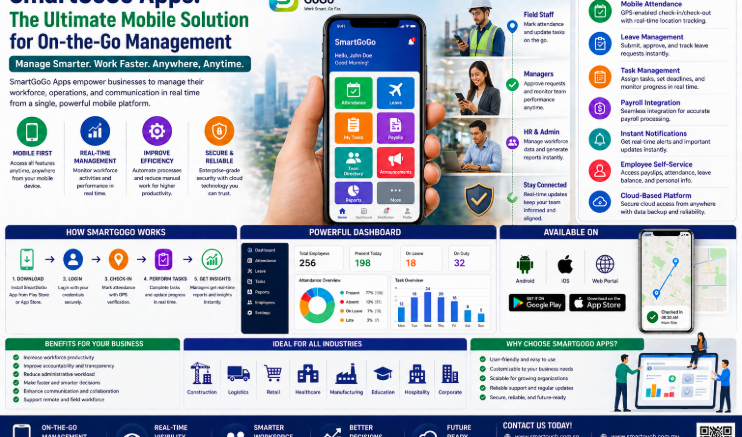
Chasing paper timesheets or waiting for staff to reach a fixed terminal wastes hours every week. A cloud-based mobile clock in solution lets employees record attendance from their smartphone, wherever their work takes them, while HR and payroll get verified, real-time data automatically. This is especially valuable for businesses in Singapore with field staff, drivers, multiple outlets, or hybrid teams who rarely sit at one desk. This guide covers what a mobile clock in solution does, the benefits it brings to Singapore businesses, and what to look for before you switch.
What Is a Cloud-Based Mobile Clock In Solution?
A mobile clock in solution is an app-based attendance system that replaces or supplements fixed biometric terminals. Employees clock in and out directly from a smartphone, with verification methods such as GPS location tagging, facial recognition or fingerprint matching confirming that the right person clocked in at the right place. Because the system is cloud-based, attendance data syncs in real time to a central dashboard, so HR, payroll and site managers see the same numbers instantly instead of waiting for someone to bring back a punch card or spreadsheet.
Why Singapore Businesses Are Moving to Mobile Clock In
Workforces are more distributed than ever. Project-based staff, delivery drivers, warehouse teams and hybrid office workers all need a way to record attendance without walking past a fixed terminal, and a cloud-based mobile clock in solution meets them where they are.
Remote and Multi-Site Workforces
Staff working across client sites, retail outlets or construction locations can clock in from wherever they are, with GPS tagging confirming their location so managers retain full visibility without needing hardware at every site.
Compliance Without the Paperwork
Verified digital attendance records make it far easier to demonstrate compliance with Singapore employment standards, calculate overtime correctly, and respond quickly if a dispute over hours ever comes up.
Key Benefits of a Cloud-Based Mobile Clock In Solution
- Employees clock in and out from anywhere using their own smartphone
- GPS and biometric verification confirm genuine, on-location attendance
- Real-time syncing removes the delay between clocking and payroll processing
- Automated overtime, lateness and allowance calculations reduce manual errors
- No dedicated hardware required at every site or outlet
Key Features to Look For
GPS and Biometric Verification
Location tagging combined with facial recognition or fingerprint checks confirms the right employee clocked in at the right place, preventing buddy punching even without a fixed terminal.
Real-Time Attendance Analytics
Dashboards should surface lateness, absenteeism and overtime trends as they happen, giving managers time to act instead of discovering issues at month end.
Payroll and Leave Integration
The strongest mobile clock in solutions sync directly with payroll and e-leave modules, so approved leave, claims and verified hours flow into pay calculations without repeated data entry.
Best Practices for Rolling Out Mobile Clock In
- Map which teams genuinely need mobile clocking versus fixed terminals
- Enrol employees’ biometric templates and set geofencing rules for each work location
- Connect the app to your existing payroll and leave systems before go-live
- Run a short pilot with one team to catch configuration issues early
- Train staff on the app and communicate how attendance data will be used
- Review attendance analytics monthly to refine shift and overtime rules
Common Mistakes to Avoid
Skipping a pilot phase often means configuration problems surface across the whole company at once instead of with a small group. Another common mistake is leaving out geofencing, which removes the location check that gives a mobile clock in solution its accuracy advantage over a simple time-logging app. Businesses that fail to connect attendance data to payroll also lose most of the time savings, since staff end up re-entering the same hours manually.
Why Choose Smart Touch Technology’s SmartGoGo
SmartGoGo is Smart Touch Technology’s mobile HR app, combining GPS-tagged and biometric clock-in with payroll, e-leave and e-claims in one platform built around Singapore compliance requirements. Employees get real-time access to payslips, leave balances and claim status, while HR gets automated overtime and allowance calculations without manual spreadsheet work.
Conclusion
A cloud-based mobile clock in solution turns scattered, hard-to-verify attendance data into accurate, real-time records that flow straight into payroll. For Singapore businesses managing field staff, multiple outlets or hybrid teams, that means fewer manual errors, faster payroll cycles and clearer compliance. Choosing a mobile clock in solution with GPS verification, biometric checks and payroll integration sets your HR team up to spend less time chasing timesheets and more time on the work that matters.
Frequently Asked Questions
Does a mobile clock in solution work without internet access on site?
Most apps can capture a clock-in offline and sync automatically once a data or WiFi connection is available, so brief coverage gaps do not stop attendance from being recorded.
How does GPS tagging prevent attendance fraud?
Each clock-in records the employee’s location alongside biometric verification, so managers can confirm staff were actually at the assigned site rather than clocking in remotely on someone else’s behalf.
Can a mobile clock in solution replace biometric terminals entirely?
Many businesses run both side by side, using fixed terminals at a main office and mobile clock-in for field or remote staff, though a fully mobile setup works well for distributed teams.
Does SmartGoGo handle leave and claims as well as attendance?
Yes. SmartGoGo combines attendance, e-leave applications and e-claims submission in the same mobile app, with all three syncing to payroll.
Is employee data secure in a cloud-based clock in app?
Reputable providers encrypt attendance and payroll data in transit and at rest, and restrict access by role so only authorised HR staff can view sensitive records.
The Real Cost of Manual Attendance Tracking
Spreadsheet-based timesheets and manual punch cards cost more than they appear to. HR staff spend hours each week chasing missing entries, correcting typos, and reconciling attendance against leave records before payroll can even begin. Disputes over hours worked are also harder to resolve without a verifiable digital trail. A cloud-based mobile clock in solution removes most of this overhead by capturing accurate, timestamped and location-verified records the moment an employee clocks in, freeing HR teams to focus on higher-value work instead of data entry.
Interested in this product? Click here to learn more: https://smartouch.com.sg/smartgogo/
Smart Touch technology pte ltd , www.smartouch.com.sg +65-63964767, sales@smartouch.com.sg , www.smartouch.com.my +607-3889903 sales@smartouch.com.my