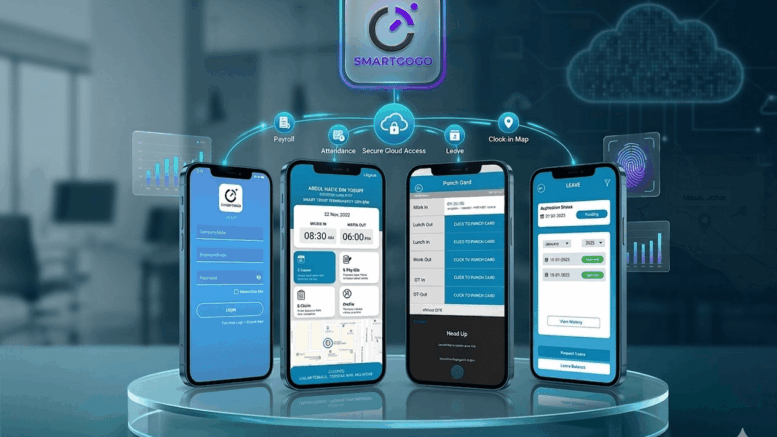
Tracking attendance across a distributed workforce is one of the biggest headaches for HR teams in Singapore. An enterprise mobile clock in app solves this by letting employees check in and out from their phones, wherever they are working, while giving HR and payroll teams accurate, real-time attendance data.
Whether your workforce is spread across construction sites, retail outlets, client premises, or remote work arrangements, an enterprise mobile clock in app removes the need for a fixed physical terminal and gives management full visibility into who clocked in, when, and from where.
Why Singapore Enterprises Need a Mobile Clock In App
Traditional fixed-terminal time attendance systems assume employees report to one location. That assumption breaks down fast for field teams, multi-site operations, and hybrid work arrangements.
Common Attendance Challenges Without a Mobile Solution
- Employees working offsite have no easy way to log attendance accurately
- HR teams struggle to consolidate attendance data across multiple locations
- Manual or paper-based logs are prone to errors and time theft
- Payroll processing is delayed waiting for attendance data from scattered sites
- No real-time visibility into who is currently clocked in across the organization
An enterprise mobile clock in app addresses these gaps directly by turning every employee’s smartphone into a secure attendance terminal.
Key Features of an Enterprise Mobile Clock In App
| Feature | Benefit |
|---|---|
| GPS-verified check-in and check-out | Confirms employees are clocking in from an approved location |
| Facial recognition or selfie verification | Prevents buddy punching and confirms the right employee is clocking in |
| Real-time attendance dashboard | Gives HR and managers live visibility into who is clocked in at any moment |
| Offline mode support | Allows employees to clock in even without stable internet, syncing once reconnected |
| Seamless payroll integration | Pushes verified attendance data directly into payroll processing |
| Leave and overtime tracking | Captures leave applications and overtime requests within the same app |
Key Benefits for Enterprises
Accurate, Fraud-Resistant Attendance
GPS verification and facial recognition together eliminate common attendance fraud tactics such as buddy punching, giving management confidence that recorded hours reflect actual attendance.
Faster Payroll Processing
Because attendance data flows directly into payroll, HR teams no longer need to manually consolidate timesheets from multiple sites before running payroll each cycle.
Better Workforce Visibility
Managers overseeing distributed teams can see in real time who is clocked in, at which site, freeing them from having to call around for status updates.
Improved Employee Experience
Employees clock in and out from a familiar smartphone interface rather than queuing at a fixed terminal, which is especially valuable for field and shift-based staff.
Best Practices for Rolling Out a Mobile Clock In App
- Pilot the app with one department or site before rolling it out organization-wide.
- Clearly communicate GPS and facial recognition data usage to employees for transparency and buy-in.
- Set geofencing boundaries carefully to reflect actual work locations, including flexibility for field staff.
- Integrate the app with existing payroll and HR systems early to avoid duplicate data entry.
- Provide simple onboarding materials so employees can start using the app with minimal friction.
Choosing the Right Enterprise Mobile Clock In App
Look for a mobile clock in app that combines reliable GPS and biometric verification with genuine offline support, since field and site-based teams frequently work in areas with unstable connectivity. Local support and proven payroll integrations for the Singapore market are also worth prioritizing.
Conclusion
An enterprise mobile clock in app gives Singapore businesses the flexibility to track attendance accurately across distributed and mobile workforces, without sacrificing the fraud prevention and payroll accuracy that fixed terminals provide. For organizations managing field teams, multiple sites, or hybrid work arrangements, it is quickly becoming an essential tool rather than a nice-to-have.
Frequently Asked Questions
1. How does an enterprise mobile clock in app prevent buddy punching?
Facial recognition or selfie verification confirms the actual employee is present at check-in, while GPS validation confirms the location matches an approved worksite.
2. Does the app work without internet access?
Yes, quality mobile clock in apps support offline mode, storing check-ins locally and syncing automatically once connectivity is restored.
3. Can it integrate with our existing payroll system?
Most enterprise mobile clock in apps offer integration options that push verified attendance data directly into payroll processing, reducing manual reconciliation.
4. Is it suitable for field and multi-site teams?
Yes, this is one of the primary use cases, since employees can check in from any approved location rather than a single fixed terminal.
5. What happens to leave and overtime requests?
Many mobile clock in apps include built-in leave and overtime request features, keeping all workforce management functions in one place.
Interested in this product? Click here to learn more: https://smartouch.com.sg/smartgogo/
Smart Touch technology pte ltd , www.smartouch.com.sg +65-63964767, sales@smartouch.com.sg , www.smartouch.com.my +607-3889903 sales@smartouch.com.my