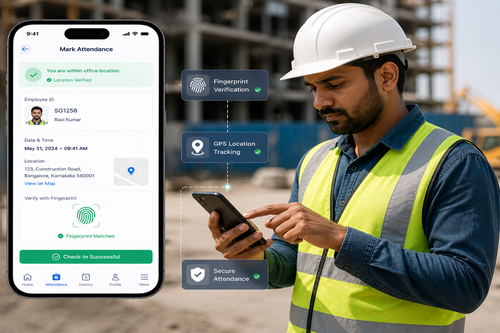
Traditional time clocks tie attendance tracking to a fixed physical location, but Singapore’s modern workforce doesn’t always work that way. Sales teams, technicians, delivery staff, and remote employees need a way to clock in accurately, wherever they are. This is exactly the problem a mobile clock in app solves — giving employees a fast, secure way to record attendance directly from their smartphone.
This article explores how a mobile clock-in app works, why it matters for Singapore businesses with distributed or mobile workforces, and what features to prioritise when choosing one.
Why Mobile Clock-In Matters
Not every employee works from a fixed office location with a biometric terminal at the door. Field service teams, sales representatives, and multi-site workers need attendance tools that move with them. A mobile clock-in app extends accurate time tracking beyond the office, without sacrificing security or accountability.
Key Benefits of a Mobile Clock-In App
1. Attendance Tracking From Anywhere
Employees can clock in and out from any location using their smartphone, making it ideal for field teams, sales staff, and employees working across multiple sites.
2. GPS and Geofencing for Accountability
To prevent misuse, mobile clock-in apps typically include GPS location tagging or geofencing, ensuring employees can only clock in when they are within an approved location radius.
3. Faster, Paperless Attendance Records
Attendance data is captured instantly and synced to a central dashboard, eliminating paper timesheets and reducing the administrative work of manually compiling attendance records.
4. Improved Accuracy for Payroll
Because clock-in and clock-out times are recorded precisely and automatically, payroll teams can rely on accurate data rather than estimated or self-reported hours.
5. Real-Time Visibility for Managers
Supervisors can view attendance status in real time, seeing exactly who has clocked in, where, and when — useful for coordinating distributed teams and confirming site coverage.
Core Features to Look For
| Feature | Why It Matters |
|---|---|
| GPS / geofencing | Confirms employees are clocking in from approved locations |
| Facial recognition or PIN login | Prevents buddy punching on mobile devices |
| Offline mode | Allows clock-in even with poor connectivity, syncing once online |
| Real-time dashboard | Gives managers instant visibility of attendance |
| Leave and overtime tracking | Extends functionality beyond basic clock-in |
| Integration with payroll systems | Streamlines the path from attendance to salary processing |
How a Mobile Clock-In App Works: Step by Step
- Employee opens the app on their smartphone at the start of their shift.
- Identity verification takes place via facial recognition, PIN, or biometric login.
- Location is verified through GPS or geofencing to confirm the employee is at an approved site.
- Clock-in time is recorded and synced instantly to the central dashboard.
- Managers and HR can view attendance data in real time or generate reports as needed.
Fixed Terminal vs. Mobile Clock-In App
| Aspect | Fixed Terminal | Mobile Clock-In App |
|---|---|---|
| Location flexibility | Limited to installed sites | Works anywhere with a smartphone |
| Suitable for field teams | No | Yes |
| Hardware cost | Requires physical devices per site | Uses employees’ existing smartphones |
| Location verification | Not applicable | GPS / geofencing built in |
| Ideal use case | Fixed offices, factories | Sales, field service, multi-site teams |
Best Practices for Rolling Out a Mobile Clock-In App
- Set clear geofencing boundaries for each work site to prevent inaccurate clock-ins.
- Combine mobile clock-in with facial recognition or PIN verification to reduce buddy punching.
- Communicate data privacy practices clearly to employees, particularly around location tracking.
- Integrate the app with existing payroll and HR systems to avoid duplicate data entry.
- Provide a simple onboarding guide so employees can start using the app with minimal friction.
Key Takeaways
A mobile clock-in app brings accurate, accountable attendance tracking to employees who don’t work from a single fixed location. With GPS verification, real-time syncing, and payroll integration, businesses gain the same accuracy as fixed terminals — without the location constraints.
Conclusion
As more Singapore businesses rely on distributed, mobile, or field-based teams, traditional fixed time clocks are no longer enough on their own. A secure mobile clock-in app extends accurate attendance tracking to wherever employees work, combining flexibility with strong accountability through GPS verification and identity checks. For businesses managing mobile workforces, adopting a mobile clock-in solution is a practical way to close attendance gaps and simplify payroll processing.
FAQ
1. What is a mobile clock-in app? It is a smartphone application that allows employees to record their attendance — clocking in and out — from any location, verified through GPS or identity checks.
2. How does the app prevent misuse or buddy punching? Most mobile clock-in apps use GPS geofencing combined with facial recognition or PIN verification to confirm the correct employee is clocking in from an approved location.
3. Does the app work without an internet connection? Many mobile clock-in apps include an offline mode, recording attendance locally and syncing automatically once connectivity is restored.
4. Can the app integrate with existing payroll software? Yes, most mobile clock-in solutions are designed to integrate with payroll and HR systems to streamline attendance-to-salary processing.
5. Is a mobile clock-in app suitable for office-based teams too? Yes. While especially useful for field or mobile workers, the app can also serve as a convenient clock-in method for office staff, particularly for remote or hybrid work arrangements.
Interested in this product? Click here to learn more: https://smartouch.com.sg/smartgogo/
Smart Touch technology pte ltd , www.smartouch.com.sg +65-63964767, sales@smartouch.com.sg , www.smartouch.com.my +607-3889903 sales@smartouch.com.my