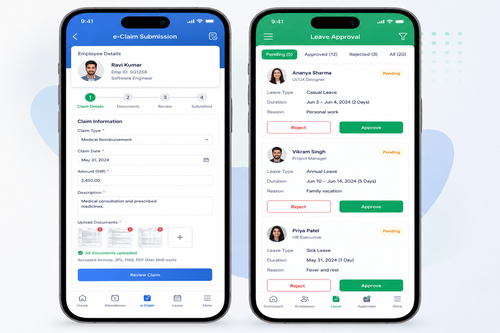
Mobile Clock In App Singapore Installation Guide for Transport Operators
Introduction
Transport operators in Singapore manage complex workforce schedules and operational demands that require reliable time tracking solutions. Whether you operate a fleet of vehicles, manage delivery services, or coordinate logistics across the island, accurate clock-in systems are essential for payroll accuracy, compliance, and operational efficiency.
Manual timekeeping methods are increasingly outdated and prone to errors. A modern mobile clock-in app streamlines attendance management, reduces administrative burden, and provides real-time visibility into your workforce. For Singapore’s fast-paced transport industry, implementing the right solution can significantly improve operational performance and employee accountability.
This guide walks you through the installation and implementation of a mobile clock-in app specifically designed for transport operators, helping you make an informed decision about your workforce management needs.
Why Transport Operators Need Mobile Clock-In Solutions
Transport businesses face unique challenges that traditional timekeeping cannot address effectively. Your employees work across multiple locations, often away from a central office. They start and finish shifts at different times, may work irregular hours, and frequently travel between job sites.
A mobile clock-in app addresses these challenges by allowing employees to record their attendance from anywhere using their smartphones. Key benefits include:
- Real-time attendance tracking across multiple locations
- Automated payroll calculations based on actual hours worked
- Reduced time theft and buddy clocking
- Improved compliance with employment regulations
- Better workforce scheduling and resource allocation
- Comprehensive attendance records for dispute resolution
For transport operators managing teams spread across Singapore, these capabilities translate directly into cost savings and operational improvements.
Understanding Mobile Clock-In App Requirements for Singapore Transport Operators
Key Features You’ll Need
Before installing any clock-in app, identify the features most relevant to your transport operation. Essential capabilities typically include:
- GPS tracking integration: Verify employees are clocking in from authorised locations
- Mobile-first design: Works reliably on smartphones without requiring a computer
- Offline functionality: Records clock-ins even when internet connectivity is poor
- Photo verification: Captures a photo at clock-in for additional verification
- Real-time reporting: Instant visibility into attendance status across your fleet
- Integration capabilities: Connects with payroll and HR systems for seamless data flow
Compliance and Legal Considerations
Singapore’s Employment Act sets specific requirements for employment practices, including accurate timekeeping and fair compensation. While the Employment Act does not prescribe a specific method for recording working hours, employers must maintain clear records of hours worked for each employee.
A mobile clock-in app helps meet these obligations by creating an objective, timestamped record of attendance. However, you should ensure your system complies with data protection requirements under the Personal Data Protection Act (PDPA) and any industry-specific regulations relevant to your transport operation.
It’s advisable to consult with your HR or legal advisors regarding the specific requirements applicable to your business and to review the latest guidance from the Ministry of Manpower (MOM) or other relevant authorities.
Installation Steps for a Mobile Clock-In App
Step 1: Choose the Right Platform
Mobile clock-in apps typically work on iOS and Android platforms. Ensure your chosen solution supports the devices your employees use. Most transport operators find that a solution supporting both platforms is essential, as your workforce may use a mix of devices.
Step 2: Prepare Your IT Infrastructure
Before installation, confirm that:
- Your business internet and network can support the app’s data requirements
- Employees have reliable mobile connectivity during working hours
- Your company’s data security policies are compatible with mobile workforce management
- You have a plan for managing device security and app updates
Step 3: Download and Install the Application
The installation process typically involves downloading the app from your device’s app store (Apple App Store or Google Play Store). Your service provider will provide specific instructions for your organisation.
Most mobile clock-in apps allow you to:
- Create an admin account for system management
- Set up employee accounts in bulk or individually
- Configure your company’s specific settings and policies
- Establish geo-fencing or location-based boundaries if using GPS features
Step 4: Configure System Settings
Once installed, you’ll need to configure settings specific to your transport operation. This includes:
- Setting work locations where employees can clock in
- Establishing approved working hours or shift patterns
- Defining approval workflows for overtime or shift changes
- Setting up reporting preferences and notification rules
- Configuring data export options for payroll integration
Step 5: Employee Setup and Training
Provide each employee with login credentials and ensure they can access the app on their devices. Conduct brief training sessions covering:
- How to download and install the app
- Creating their personal login credentials
- Clocking in and out procedures
- Viewing their attendance records
- Understanding policies around location verification or photo capture
- Troubleshooting common issues
Clear communication about why the new system is being implemented helps with adoption and reduces resistance.
Step 6: Test and Validate
Before full rollout, conduct testing with a small group of employees. Verify that:
- Clock-ins and clock-outs are recorded accurately
- Data syncs correctly with your backend systems
- GPS or location features work reliably
- Photo capture functions properly if enabled
- Reports generate correctly for payroll processing
Gather feedback from this pilot group and resolve any issues before company-wide implementation.
Step 7: Full Rollout and Monitoring
Once testing is complete, roll out the system to all employees. Monitor usage patterns and troubleshoot any issues that arise. Most providers offer support during this phase.
Continue to gather feedback from employees and managers to identify any process improvements needed.
Common Installation Challenges and Solutions
Poor Mobile Connectivity
Challenge: Transport operators often work in areas with inconsistent mobile signal, making real-time clock-ins difficult.
Solution: Choose an app with robust offline functionality that can queue clock-ins when connectivity is unavailable and sync them automatically when the signal returns. This ensures no attendance data is lost.
Device Compatibility Issues
Challenge: Your workforce may use a variety of smartphone models and operating system versions.
Solution: Ensure the app supports a wide range of devices and OS versions. Test on devices your employees actually use before full implementation.
Employee Resistance
Challenge: Some employees may resist changing from familiar timekeeping methods.
Solution: Communicate the benefits clearly, provide thorough training, and be available to address concerns. Emphasise how the system protects employees by creating accurate records of their work hours.
Integration with Existing Systems
Challenge: Your transport business likely uses payroll, HR, or fleet management software that must work with the new clock-in app.
Solution: Choose a solution that integrates with your existing systems or has a clear data export process. This eliminates manual data re-entry and reduces errors.
How SmartGogo Apps Can Support Your Transport Operation
SmartGogo apps provide a mobile-first platform designed specifically for businesses managing distributed workforces. For transport operators in Singapore, SmartGogo offers a practical solution for streamlining attendance management across your fleet.
The platform enables employees to clock in easily from their smartphones, creating timestamped records that support accurate payroll and compliance requirements. With features designed for mobile-first operations, SmartGogo helps transport businesses reduce administrative burden and improve workforce visibility.
The app’s practical design recognises that your employees work in the field, not at desks. It allows straightforward time tracking without complex procedures that slow down your operations.
By implementing SmartGogo in your transport business, you can achieve more efficient attendance management, streamline payroll processing, and create reliable records for compliance purposes.
Best Practices for Transport Operators Using Mobile Clock-In Apps
- Establish clear policies: Define when and where employees must clock in, how to handle missed clock-ins, and consequences for inaccurate reporting
- Regular audits: Review attendance records regularly to identify patterns or discrepancies
- Maintain backup records: Keep copies of attendance data in case of system issues
- Stay compliant: Ensure your use of the system complies with Singapore employment regulations and data protection laws
- Gather feedback: Continuously collect input from employees and managers to improve processes
- Keep the system updated: Ensure your app and devices stay current with the latest security and feature updates
Making the Transition Smooth
Transitioning to a mobile clock-in system doesn’t need to be disruptive. Most successful implementations follow a phased approach, starting with a pilot group and gradually expanding to the entire workforce. This allows time to identify and resolve issues while building confidence in the new system.
Communication is key throughout the process. Explain why the change is happening, how it benefits both the business and employees, and what support is available during the transition.
Most importantly, choose a solution that aligns with your specific operational needs. Transport operators have distinct requirements that differ from office-based businesses, so selecting a platform designed with these considerations in mind will ensure better adoption and more effective results.
Interested in Implementing a Mobile Clock-In Solution?
If you’re ready to modernise your transport operation’s attendance management, SmartGogo apps offers a practical, mobile-friendly solution designed for Singapore businesses. Interested in this product? Click here to learn more about how SmartGogo can support your transport operation.
Conclusion
Mobile clock-in apps represent a significant step forward for transport operators managing distributed teams across Singapore. By implementing the right solution, you can streamline attendance tracking, improve payroll accuracy, and create robust compliance records—all while reducing administrative burden.
The installation process, while requiring careful planning and employee training, delivers substantial operational benefits. By following the steps outlined in this guide—from system selection through full rollout—you can ensure a smooth transition that your workforce and management teams will appreciate.
With the right mobile clock-in app, your transport business can focus on what it does best: serving your customers efficiently and reliably.
Smart Touch technology pte ltd , www.smartouch.com.sg +65-63964767, sales@smartouch.com.sg , www.smartouch.com.my +607-3889903 sales@smartouch.com.my