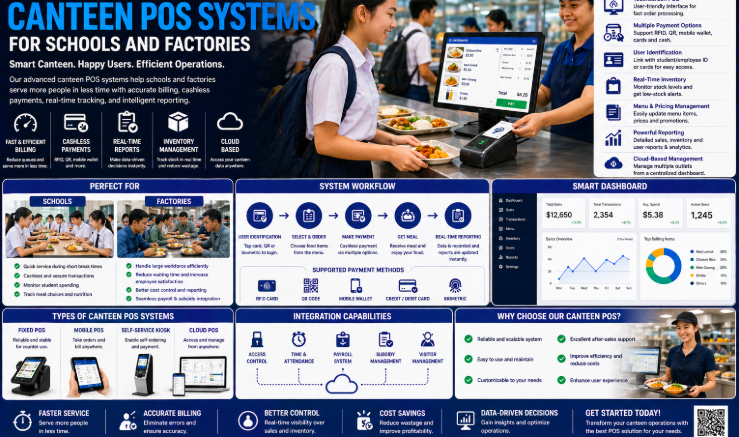
Long queues, cash handling, and manual subsidy tracking are becoming things of the past in Singapore workplaces. A Contactless Face Recognition Canteen System lets employees pay for meals in seconds using just their face, while giving HR and finance teams accurate, real-time data on canteen usage and subsidies. This article explains how the system works, why Singapore businesses are adopting it, and what to consider before rolling one out at your workplace or facility.
What Is a Contactless Face Recognition Canteen System?
A face recognition canteen system replaces cash, cards, or manual sign-in sheets with biometric verification at the point of sale. Employees or residents simply look at a terminal, which identifies them and deducts the meal cost from a linked account, subsidy balance, or payroll deduction. Because the process is contactless, it is faster and more hygienic than handling cash or swiping cards, particularly in dormitories, factories, and large offices with high foot traffic during meal times.
Why Singapore Businesses Are Switching to Contactless Canteen Payments
Workplace canteens and dormitory dining halls in Singapore often serve hundreds or thousands of people within a narrow meal window. Traditional payment methods create bottlenecks and administrative overhead that a contactless system can remove.
Common Problems with Traditional Canteen Payment Methods
- Long queues during peak meal times as staff process cash or count change.
- Difficulty tracking meal subsidies accurately across large workforces.
- Risk of lost or shared access cards leading to incorrect billing.
- Manual reconciliation between canteen sales and payroll deductions.
- Hygiene concerns from shared cash, cards, or terminals requiring physical contact.
Key Features of a Face Recognition Canteen System
| Feature | Description |
|---|---|
| Biometric identification | Face recognition verifies each user in under a second, no card or PIN required |
| Subsidy management | Automatically applies company or government meal subsidies at the point of purchase |
| Real-time reporting | Tracks daily meal counts, spending, and subsidy usage across the workforce |
| Payroll integration | Deducts meal costs directly from payroll where required, reducing manual billing |
| Menu and pricing control | Supports multiple meal types and price tiers configured centrally |
| Offline resilience | Terminals can continue operating and sync data once connectivity is restored |
Key Benefits of Going Contactless
- Faster service — transactions complete in seconds, reducing queue times during peak hours.
- Improved hygiene — no shared cash, cards, or PIN pads to touch.
- Accurate subsidy tracking — every transaction is logged against the correct employee or resident automatically.
- Reduced fraud — biometric verification prevents card sharing or proxy use.
- Simplified reconciliation — canteen sales data feeds directly into reporting and payroll systems.
How the System Works: Step by Step
1. Enrolment
Each employee or resident’s facial data is captured once and securely stored in the system.
2. Top-Up or Subsidy Allocation
Accounts are pre-loaded with credit, or a subsidy allowance is configured based on company policy.
3. Meal Selection
At the canteen counter, the user selects their meal, and the terminal captures the transaction.
4. Face Verification
The terminal matches the user’s face against the enrolled database and confirms their identity.
5. Automatic Deduction
The meal cost is deducted from the user’s balance or logged for payroll deduction, with the transaction recorded instantly.
6. Reporting
Canteen managers and HR teams can review daily, weekly, or monthly usage reports at any time.
Comparing Payment Methods: Cash, Card, and Face Recognition
| Factor | Cash | Access Card | Face Recognition |
|---|---|---|---|
| Speed at counter | Slow — counting change | Moderate — tap and verify | Fast — instant match |
| Hygiene | Low — shared physical currency | Moderate — shared card readers | High — no physical contact |
| Risk of fraud or sharing | Moderate | High — cards can be shared or lost | Low — tied to biometric identity |
| Subsidy tracking accuracy | Manual, error-prone | Automated but card-dependent | Automated and identity-verified |
| Reporting effort | High — manual reconciliation | Moderate | Low — automatic reporting |
This comparison highlights why more Singapore businesses are moving away from cash and cards toward biometric verification for high-volume canteen environments.
Best Practices for Implementing a Canteen System
Plan Terminal Placement Around Peak Flow
Position terminals to minimise bottlenecks, especially near high-traffic serving counters.
Set Clear Subsidy Rules Before Launch
Define subsidy amounts, eligible meal types, and any daily or monthly caps before going live to avoid confusion.
Provide a Backup Verification Method
Have a fallback process, such as manual verification, for rare cases where facial recognition fails, such as with masks or injuries.
Communicate the Change Early
Inform employees or residents about how the new system works and how their data will be used and protected.
Key Takeaways
- Face recognition canteen systems remove cash, cards, and manual sign-in from mealtime payments.
- Businesses benefit from faster service, better hygiene, and accurate subsidy tracking.
- The system integrates with payroll and reporting tools to reduce administrative work.
- Careful planning of subsidy rules and terminal placement helps ensure a smooth rollout.
- A backup verification method should be in place for edge cases.
Frequently Asked Questions
1. How fast is face recognition verification at the canteen counter?
Verification typically takes less than a second per person, allowing queues to move quickly even during peak meal times.
2. Can the system handle different subsidy levels for different employees?
Yes. Subsidy rules can be configured per individual, department, or employment type, and are applied automatically at the point of purchase.
3. What happens if the system cannot recognise someone’s face?
Most deployments include a backup verification method, such as manual entry or an alternative ID check, to handle exceptions.
4. Is employee facial data stored securely?
Reputable systems store biometric data with appropriate encryption and access controls, and businesses should confirm data handling practices with their provider before rollout.
5. Can the canteen system integrate with existing payroll software?
Yes. Many face recognition canteen systems can pass transaction data directly into payroll or HR software for automatic deductions and reporting.
6. Can the system be used across multiple canteen locations?
Yes. Businesses with several sites or dormitory blocks can enrol employees once and use their face recognition profile across any connected terminal in the network.
Conclusion
A Contactless Face Recognition Canteen System addresses some of the most persistent headaches in workplace dining: long queues, manual subsidy tracking, and reconciliation errors. By combining fast biometric verification with automated reporting and payroll integration, Singapore businesses can serve meals more efficiently while gaining clearer visibility into canteen spending. As hygiene and operational efficiency remain top priorities, contactless canteen payment is quickly becoming the standard for workplaces and dormitories alike.
Click here for more product information: https://smartouch.com.sg/canteen-system/
Smart Touch technology pte ltd , www.smartouch.com.sg +65-63964767, sales@smartouch.com.sg , www.smartouch.com.my +607-3889903 sales@smartouch.com.my