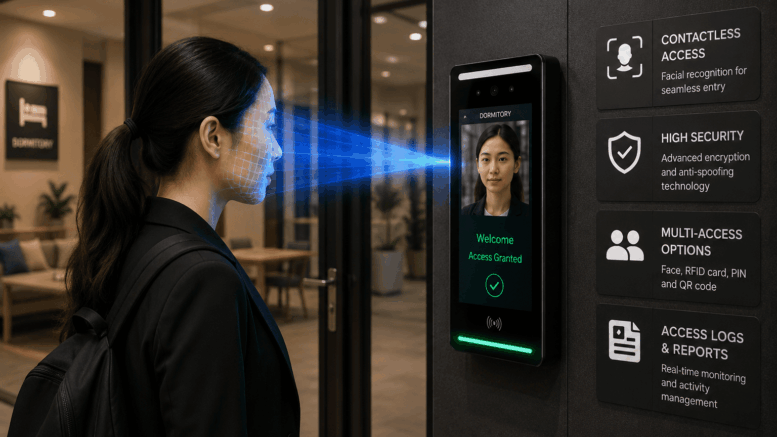
Modern workplaces demand more than traditional locks and access cards to protect employees, visitors, and business assets. As organisations across Singapore embrace digital transformation, smart office door access control systems with facial recognition are becoming the preferred solution for secure, convenient, and contactless access management.
Unlike conventional card-based systems, facial recognition verifies the identity of the actual person requesting access rather than simply validating a card or PIN. Combined with cloud-based administration, intelligent access policies, and real-time monitoring, businesses can improve workplace security while simplifying daily operations.
Smart Touch Technology provides intelligent facial recognition door access systems that integrate seamlessly with HR software, visitor management, time attendance, and building security solutions, creating a complete smart office ecosystem.
Why Traditional Office Access Systems Are Becoming Obsolete
For many years, offices have relied on access cards, key fobs, passwords, and PIN codes to secure their premises. While these methods remain common, they present several operational and security challenges.
Common issues include:
- Lost access cards
- Shared employee cards
- Cloned RFID credentials
- Forgotten PIN codes
- Manual key management
- Time-consuming access updates
These vulnerabilities increase security risks while creating additional administrative work for HR and facility management teams.
Facial recognition eliminates these challenges by linking building access directly to an authorised individual’s biometric identity.
What Is a Smart Office Door Access Control System?
A Smart Office Door Access Control System is an intelligent security solution that uses AI-powered facial recognition technology to authenticate employees before granting access to designated office areas.
Instead of carrying access cards or remembering PIN codes, employees simply approach the door where the system automatically recognises their face and unlocks the door within seconds.
Every access event is securely recorded, providing organisations with a complete digital audit trail.
How Facial Recognition Door Access Works
The access process is fast, seamless, and highly secure.
Step 1 – Employee Enrolment
Each authorised employee is registered into the system using facial recognition.
Their encrypted biometric template is securely stored within the system database.
Step 2 – Identity Verification
When an employee approaches the office entrance, the facial recognition camera captures a live image.
AI technology compares the live image with the authorised database in real time.
Step 3 – Door Unlock
If verification is successful, the electric lock automatically unlocks, allowing seamless entry.
If the individual is not authorised, access is denied and administrators can receive alerts based on configured security policies.
Step 4 – Activity Logging
Every successful and unsuccessful access attempt is automatically recorded with:
- User identity
- Date
- Time
- Entry location
- Access status
This creates a complete digital audit trail for security monitoring and compliance purposes.
Key Features of Smart Touch Office Door Access Control
AI Facial Recognition
Advanced facial recognition provides fast and reliable identity verification without requiring physical credentials.
Benefits include:
- Contactless authentication
- Fast recognition
- High accuracy
- Real-time verification
- Reduced unauthorised access
Contactless Entry
Employees simply walk towards the entrance.
There is:
- No card tapping
- No PIN entry
- No physical contact
- No waiting in long queues
This improves workplace efficiency while supporting hygienic, touch-free access.
Zone-Based Access Control
Not every employee requires access to every office area.
Smart Touch allows administrators to create customised access permissions for areas such as:
- Executive offices
- HR departments
- Finance offices
- IT server rooms
- Meeting rooms
- Research laboratories
- Storage rooms
- Data centres
Access permissions can be assigned based on employee roles and responsibilities.
Cloud-Based Access Management
The Smart Touch cloud platform enables administrators to manage every office location remotely.
Using a central dashboard, administrators can:
- Add employees
- Remove employees
- Update permissions
- Configure access schedules
- Monitor activity
- Generate reports
Changes take effect immediately without reprogramming physical access cards.
Real-Time Monitoring
Facility managers can monitor building access in real time.
The dashboard displays:
- Current access activity
- Entry history
- Failed access attempts
- Door status
- User information
- Security alerts
This provides greater visibility into workplace security operations.
Digital Audit Trail
Every access event is automatically stored within the system.
Reports include:
- Entry records
- Exit records
- User identity
- Timestamp
- Door location
- Access outcome
These digital records support internal investigations, operational reviews, and compliance reporting.
Integration with Smart Touch Solutions
Smart Touch door access systems integrate with a range of workplace management solutions, including:
- SmartHR
- SmartGoGo Mobile Attendance
- Visitor Management System (VMS)
- Swing Barrier System
- Turnstile Access Control
- Payroll Systems
- Employee Attendance
- Building Access Management
This integrated platform reduces duplicate administration while providing a unified view of workforce and building access activities.
Benefits of Smart Office Door Access Control
Businesses adopting Smart Touch facial recognition access systems enjoy numerous operational advantages.
Enhanced Workplace Security
Facial recognition authenticates the individual rather than a transferable credential, helping reduce unauthorised access.
Faster Employee Entry
Employees enter the workplace quickly without searching for access cards or remembering PIN codes.
Simplified Administration
Cloud-based management enables administrators to update permissions instantly without replacing cards or changing locks.
Scalable Multi-Site Management
Multiple offices, branches, and buildings can be managed through one central platform.
Improved Compliance
Detailed access logs support workplace security reviews and internal audit requirements.
Better Employee Experience
Touch-free authentication creates a smooth and professional entry experience while reducing delays during peak office hours.
Traditional Access vs Facial Recognition Access
| Feature | Card / PIN Access | Smart Facial Recognition |
|---|---|---|
| Identity Verification | Validates credential | Verifies authorised individual |
| Lost Credentials | Common | Not applicable |
| Shared Access Risk | Higher | Significantly reduced |
| Contactless Entry | No | Yes |
| Cloud Management | Limited | Yes |
| Real-Time Monitoring | Basic | Advanced |
| Digital Audit Trail | Yes | Comprehensive |
| Multi-Site Support | Available | Centralised Cloud Management |
Industries That Benefit
Smart Touch office access control solutions are suitable for:
- Corporate Offices
- Financial Institutions
- Government Agencies
- Healthcare Facilities
- Educational Institutions
- Manufacturing Companies
- Logistics Operations
- Technology Companies
- Commercial Buildings
- Multi-Tenant Offices
Best Practices for Deployment
For optimal performance:
- Identify security zones before installation.
- Enrol employees before system go-live.
- Configure role-based access permissions.
- Integrate access control with HR systems where appropriate.
- Review access reports regularly.
- Remove access immediately when employees leave the organisation.
- Keep camera lenses clean for consistent recognition accuracy.
- Educate employees on how biometric information is collected, managed, and protected.
These practices help improve both security and operational efficiency.
Supporting Responsible Biometric Security
Biometric access systems should be implemented responsibly with appropriate governance.
Smart Touch systems support secure administration through encrypted biometric templates, configurable administrator permissions, detailed audit logs, and integration with existing workplace management systems.
Organisations remain responsible for establishing internal access policies, managing employee permissions, and ensuring compliance with Singapore’s applicable privacy and employment regulations.
Why Choose Smart Touch Technology?
Smart Touch Technology is a trusted provider of intelligent workplace security and access control solutions in Singapore.
Our solutions include:
- AI Facial Recognition Door Access
- Smart Office Access Control
- Employee Attendance Management
- SmartGoGo Mobile Attendance
- SmartHR
- Visitor Management System
- Swing Barrier Systems
- Turnstiles
- Building Access Management
From consultation and site assessment to installation, employee enrolment, software configuration, integration, training, maintenance, and after-sales support, Smart Touch delivers complete access control solutions tailored to your business requirements.
Whether you operate a single office or manage multiple corporate locations, Smart Touch helps modernise workplace security with reliable and scalable technology.
Frequently Asked Questions
How does facial recognition improve office security?
Facial recognition verifies the identity of the actual person requesting access rather than validating a card or PIN, helping reduce the risks associated with lost, shared, or cloned credentials.
Can different office areas have different access permissions?
Yes. Administrators can configure role-based and zone-based access permissions for departments, meeting rooms, server rooms, executive offices, and other restricted areas.
Is biometric information stored securely?
Smart Touch systems use encrypted biometric templates and administrator-controlled access to help protect stored biometric information.
Can the system integrate with HR software?
Yes. Smart Touch solutions can integrate with SmartHR and other workforce management systems to simplify employee administration and access management.
Is the system suitable for multiple offices?
Yes. The cloud-based management platform allows administrators to manage users, permissions, and access activity across multiple buildings, offices, and branches from one central dashboard.
Secure Your Workplace with Smart Office Door Access Control
Modern organisations require smarter workplace security that balances convenience with protection. Smart Touch Technology’s Smart Office Door Access Control System with Facial Recognition provides fast, contactless authentication, cloud-based administration, intelligent access management, and detailed audit reporting—all within one integrated platform.
Whether you are upgrading an existing office or implementing access control for a new workplace, Smart Touch delivers a scalable solution that enhances workplace security while improving the employee experience.
Learn more about our Facial Recognition Door Access Solution:
Smart Touch Technology Pte Ltd
www.smartouch.com.sg | +65-63964767 | sales@smartouch.com.sg
www.smartouch.com.my | +607-3889903 | sales@smartouch.com.my