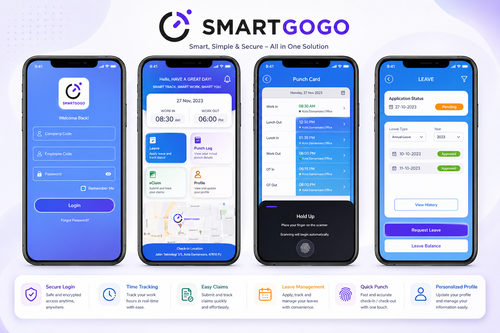
Not every business has employees working from a single fixed location. Field service teams, sales staff, delivery personnel, and multi-site retail employees all need a way to clock in and out that doesn’t depend on a physical terminal at one address. A mobile clock-in app solves this — and for small and medium enterprises in Singapore, it’s often a far more practical and affordable option than fixed biometric hardware at every location.
This article explains how mobile clock-in apps work, why they suit SMEs in particular, and what to look for when choosing one.
What Is a Mobile Clock In App?
A mobile clock-in app allows employees to record attendance directly from their smartphone, typically using GPS location verification, geofencing, or photo capture to confirm they are at the correct work location at the time of clocking in. This removes the need for a fixed attendance terminal at every site.
Why This Suits SMEs Specifically
SMEs often operate with lean budgets and distributed teams — a retail chain with multiple outlets, a field service company with technicians visiting client sites, or a small business with remote and in-office staff. Installing fixed attendance hardware at every location is costly and often unnecessary. A mobile app achieves the same attendance accuracy at a fraction of the setup cost and complexity, and it scales naturally as the business opens new locations or adds field staff, without requiring a corresponding investment in fixed hardware each time.
Key Benefits for SMEs
| Benefit | Impact |
|---|---|
| Low setup cost | No hardware installation required at each site |
| Location verification | GPS or geofencing confirms employees clock in from the correct location |
| Flexible for mobile teams | Suits field staff, delivery personnel, and multi-site employees |
| Real-time visibility | Managers see attendance status across all locations instantly |
| Payroll integration | Attendance data flows directly into payroll processing |
How a Mobile Clock In App Works: A Step-by-Step Guide
- App installation and enrolment — Employees install the app and are linked to their employee profile and assigned work location(s).
- Geofence configuration — Administrators set allowed clock-in zones for each work site or client location.
- Clock-in/out — Employees tap to clock in or out; the app captures GPS location and, optionally, a photo for verification.
- Manager review — Supervisors can view real-time attendance status and receive alerts for clock-ins outside approved zones.
- Payroll sync — Verified attendance data feeds directly into payroll calculation, removing manual timesheet entry.
Best Practices for Rollout
Set geofence radius sensibly — too tight, and employees may struggle to clock in near building entrances; too loose, and location verification loses meaning. Communicate clearly to staff how location data is used and stored, to build trust and support PDPA compliance. Use photo capture selectively for roles where identity verification is a higher priority, such as field service or delivery. Review attendance exceptions weekly rather than only at payroll close. Provide a brief training session or short guide when rolling out the app, since even simple mobile tools benefit from a clear first-use walkthrough to avoid early confusion or support requests.
Comparing Attendance Options for Distributed Teams
- Fixed biometric terminals: Accurate but costly to deploy across multiple sites.
- Manual timesheets: Low cost but prone to inaccuracy and disputes.
- Mobile clock-in apps: Low-cost, location-verified, and suited to mobile or multi-site teams.
Choosing the Right Mobile Clock In App
SMEs should prioritise ease of use, since adoption depends on staff finding the app simple and quick to operate. Reliable GPS and geofencing accuracy is essential to avoid false rejections. Integration with existing payroll software reduces administrative overhead, and a free demo or trial period is a practical way to test real-world performance before committing.
Cost and ROI Considerations
Mobile clock-in apps are typically priced per user per month, with no hardware investment required, making the cost structure predictable and easy to scale as headcount grows or shrinks. The return comes primarily through eliminated timesheet disputes, reduced administrative time spent chasing manual attendance records, and more accurate payroll for field-based or shift-based staff whose hours were previously self-reported.
Real-World Application for Singapore SMEs
Retail chains, F&B outlets, cleaning contractors, and field service providers in Singapore have adopted mobile clock-in apps specifically because their staff move between multiple locations throughout the week. Owners commonly report that geofenced mobile attendance removes the ambiguity of “was this person actually on site” that manual timesheets could never fully resolve, while giving managers real-time visibility without needing to physically check each location.
Key Takeaways
- Mobile clock-in apps suit SMEs with distributed, field-based, or multi-site teams.
- GPS and geofencing verify employees are clocking in from the correct location.
- Setup costs are significantly lower than fixed biometric hardware at every site.
- Integration with payroll reduces manual timesheet processing.
Conclusion
For SMEs managing employees across multiple sites or in the field, a mobile clock-in app delivers accurate, location-verified attendance tracking without the cost and complexity of installing hardware everywhere. It’s a practical fit for Singapore’s growing base of small and medium businesses balancing tight budgets against the need for reliable workforce data — and trying it with a free demo is a low-risk way to see the fit before committing.
Frequently Asked Questions
1. Does a mobile clock-in app work without internet connectivity? Most apps support offline clock-in with automatic syncing once connectivity is restored.
2. Can the app prevent employees from clocking in from the wrong location? Yes, geofencing restricts valid clock-ins to defined zones around approved work locations.
3. Is a mobile clock-in app suitable for a business with only one office? It can be, though single-site businesses may also consider fixed terminals; mobile apps are especially valuable for multi-site or field-based teams.
4. How is employee location data protected? Reputable apps encrypt location data and limit access to authorised administrators, in line with PDPA requirements.
5. Can I try the app before purchasing? Yes, a free demo is available to test the app’s functionality and fit for your team before committing.
6. Does the app support different clock-in rules for different employee groups? Yes, geofence zones and clock-in rules can typically be configured per employee, team, or role, accommodating businesses with a mix of fixed and mobile staff.
Interested in this product? Click here to learn more: https://smartouch.com.sg/smartgogo/
Smart Touch technology pte ltd , www.smartouch.com.sg +65-63964767, sales@smartouch.com.sg , www.smartouch.com.my +607-3889903 sales@smartouch.com.my