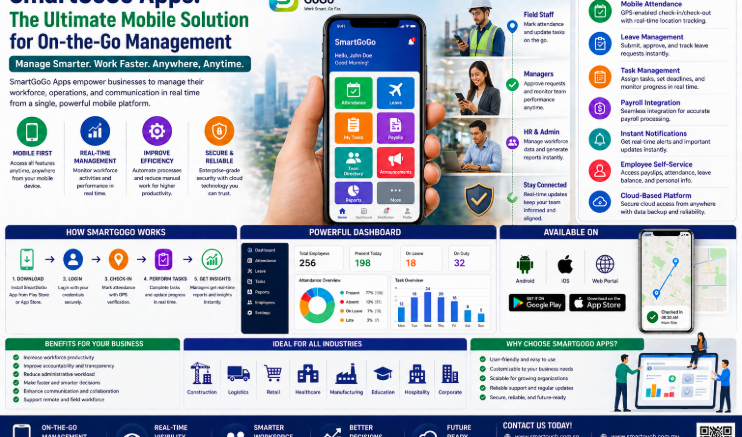
Managing employees across multiple offices, project sites, customer locations, or remote work environments requires more than traditional attendance systems. As businesses in Singapore continue to embrace hybrid work, field operations, and multi-site workforce management, cloud-based attendance solutions have become an essential part of modern business operations.
Unlike traditional biometric terminals that require dedicated hardware at every location, a Cloud-Based Remote Workforce Tracking App allows employees to clock in and out securely using their smartphones while giving managers real-time visibility into attendance across every location.
Smart Touch Technology’s SmartGoGo Mobile Attendance App provides a complete cloud workforce management solution with GPS attendance, geofencing, employee time tracking, SmartHR integration, payroll-ready reporting, leave management, claims management, and real-time workforce monitoring.
Why Traditional Attendance Systems Are No Longer Enough
Traditional attendance systems are designed primarily for fixed office environments where employees report to the same location every day.
However, businesses today often operate across:
- Multiple offices
- Construction sites
- Customer locations
- Retail outlets
- Warehouses
- Manufacturing plants
- Remote workplaces
- Field service operations
Installing biometric terminals at every location increases hardware costs, maintenance requirements, and implementation time while reducing operational flexibility.
What Is a Cloud-Based Remote Workforce Tracking App?
A Cloud-Based Remote Workforce Tracking App is a mobile workforce management solution that enables employees to record attendance directly from their smartphones while securely synchronising attendance records to a central cloud platform.
Managers can monitor attendance, employee locations (where configured), work schedules, leave applications, overtime, and attendance reports through a single dashboard accessible from anywhere.
Because the solution operates through the cloud, new worksites and employees can be added quickly without installing additional attendance hardware.
SmartGoGo Mobile Attendance Solution
Smart Touch Technology’s SmartGoGo App provides a comprehensive workforce management platform for organisations of all sizes.
GPS Attendance Verification
SmartGoGo supports GPS-based attendance verification.
Features include:
- GPS attendance
- Configurable geofencing
- Location verification
- Remote clock in
- Remote clock out
- Attendance history
GPS verification helps organisations confirm attendance according to configured workplace locations and attendance policies.
Geofencing
Geofencing enables organisations to define approved work locations for attendance.
Capabilities include:
- Multiple work locations
- Configurable attendance radius
- Office location verification
- Project site verification
- Branch location management
- Multi-site attendance
Attendance policies can be customised to suit operational requirements.
Real-Time Cloud Dashboard
Managers have access to a central cloud dashboard for workforce visibility.
Dashboard features include:
- Live attendance monitoring
- Employee status
- Multi-site attendance overview
- Attendance reports
- Late attendance monitoring
- Absent employee tracking
- Workforce analytics
Real-time visibility enables faster workforce management decisions.
Employee Time Attendance
SmartGoGo provides complete employee attendance management.
Features include:
- Clock in
- Clock out
- Shift attendance
- Attendance history
- Overtime records
- Attendance reports
Attendance information is automatically synchronised with the cloud platform.
SmartHR Integration
SmartGoGo integrates seamlessly with SmartHR.
Integration includes:
- Employee database synchronisation
- Staff onboarding
- Leave management
- Employee claims
- Payroll preparation
- Workforce administration
This integration reduces manual administration while improving data consistency across HR operations.
Leave & Claims Management
Employees can manage HR requests directly through the mobile application.
Available functions include:
- Leave application
- Leave balance
- Leave approval workflow
- Expense claims
- Claim submission
- Claim approval
Managers can review and approve requests through the same integrated platform.
Payroll-Ready Reporting
Attendance information can be prepared for payroll processing through comprehensive reports.
Reporting features include:
- Attendance summaries
- Working hours
- Overtime reports
- Employee attendance history
- Exportable reports
- Payroll preparation
Digital reporting reduces manual reconciliation before payroll processing.
Multi-Site Workforce Management
SmartGoGo supports organisations operating across multiple locations.
Capabilities include:
- Multi-branch management
- Multi-office attendance
- Construction site attendance
- Project site attendance
- Retail outlet attendance
- Warehouse attendance
New work locations can be configured without deploying additional attendance terminals.
Benefits of SmartGoGo Remote Workforce Tracking
Businesses implementing SmartGoGo benefit from:
- Cloud-based attendance management
- Mobile clock in and clock out
- GPS attendance verification
- Geofencing support
- Lower hardware investment
- Multi-site workforce management
- SmartHR integration
- Payroll-ready reporting
- Leave management
- Employee claims
- Real-time workforce visibility
- Scalable deployment
Fixed Biometric Terminal vs SmartGoGo Mobile Attendance
| Feature | Fixed Biometric Terminal | SmartGoGo Cloud Workforce App |
|---|---|---|
| Hardware Installation | Required | Smartphone-Based |
| Multiple Site Support | Additional Hardware Needed | Unlimited Cloud Configuration |
| GPS Verification | Not Available | Configurable GPS Attendance |
| Geofencing | No | Yes |
| Real-Time Dashboard | Limited | Cloud Dashboard |
| Employee Leave | Separate System | Integrated |
| Claims Management | Separate System | Integrated |
| Payroll Reports | Available | Cloud Export Reports |
| Scalability | Hardware Dependent | Easily Expandable |
Integration with Smart Touch Workplace Solutions
SmartGoGo integrates seamlessly with:
- SmartHR
- Employee Time Attendance
- Door Access Control
- AI Facial Recognition
- Visitor Management System (VMS)
- Smart Swing Barrier
- Payroll Systems
- Employee Claims
- Leave Management
The integrated ecosystem enables organisations to manage workforce attendance, HR administration, access control, and employee information through one intelligent cloud platform.
Suitable for Various Industries
SmartGoGo is ideal for:
- Construction Companies
- Manufacturing Facilities
- Logistics Companies
- Warehouses
- Retail Chains
- Property Management
- Field Service Teams
- Sales Teams
- Healthcare Organisations
- Educational Institutions
- Government Agencies
- Corporate Offices
Supporting Responsible Workforce Management
Cloud workforce management solutions help organisations improve attendance accuracy through configurable attendance policies, GPS-based verification, digital reporting, encrypted communication, and centralised administration.
Smart Touch provides administrator controls, SmartHR integration, cloud-based reporting, and configurable attendance workflows to support responsible workforce management. Organisations remain responsible for establishing attendance policies, configuring work locations, managing employee permissions, and ensuring compliance with applicable employment and privacy regulations.
Why Choose Smart Touch Technology Singapore?
Smart Touch Technology is a trusted provider of cloud workforce management and HR solutions in Singapore.
Our integrated platform includes:
- SmartGoGo Mobile Attendance App
- SmartHR
- Employee Time Attendance
- Leave Management
- Claims Management
- GPS Attendance
- Geofencing
- Door Access Control
- AI Facial Recognition
- Visitor Management System (VMS)
From consultation and implementation to employee onboarding, administrator training, software configuration, cloud deployment, preventive maintenance, and after-sales technical support, Smart Touch delivers scalable workforce solutions tailored to your business.
Whether you manage a construction company, logistics operation, manufacturing plant, retail chain, property management company, healthcare organisation, or multi-site enterprise, SmartGoGo provides a reliable attendance solution that improves workforce visibility while reducing administration.
Best Practices for Implementing a Cloud Workforce Tracking App
To maximise the benefits of your deployment:
- Configure authorised work locations and geofencing policies before go-live.
- Register employees and provide onboarding for mobile attendance.
- Define attendance rules based on shifts and operational requirements.
- Integrate SmartGoGo with SmartHR for streamlined workforce management.
- Review attendance reports regularly to identify anomalies early.
- Update worksite locations promptly when new projects begin.
- Train managers on dashboard reporting and approval workflows.
- Establish clear internal policies explaining how attendance and location information are used.
A well-planned implementation helps improve attendance accuracy while supporting efficient workforce management.
Frequently Asked Questions
Does SmartGoGo require dedicated attendance hardware?
No. SmartGoGo runs on Android and iOS smartphones, allowing employees to clock in and out without installing biometric terminals at every work location.
How does GPS attendance work?
SmartGoGo supports configurable GPS attendance and geofencing. Organisations can define authorised work locations and attendance policies according to their operational requirements.
Can SmartGoGo support businesses with multiple sites?
Yes. The cloud platform allows organisations to manage attendance across multiple offices, construction sites, warehouses, retail outlets, and project locations through one central dashboard.
Does SmartGoGo integrate with payroll?
Yes. Attendance reports can be prepared for payroll processing, reducing manual reconciliation and simplifying payroll administration.
Is SmartGoGo suitable for small businesses?
Yes. SmartGoGo scales from small businesses with a handful of employees to large enterprises managing thousands of employees across multiple locations.
Modernise Workforce Attendance with SmartGoGo
Traditional attendance systems become increasingly expensive and difficult to manage as organisations expand across multiple sites. SmartGoGo, Smart Touch Technology’s cloud-based workforce tracking app, combines GPS attendance, geofencing, SmartHR integration, employee time attendance, leave management, claims management, and real-time reporting into one intelligent platform.
Whether you manage field teams, construction workers, retail staff, logistics operations, healthcare professionals, or employees across multiple offices, SmartGoGo provides a scalable cloud attendance solution that improves workforce visibility while reducing hardware costs and administrative effort.
Learn more about SmartGoGo Mobile Attendance Solution:
Smart Touch Technology Pte Ltd
www.smartouch.com.sg | +65-63964767 | sales@smartouch.com.sg
www.smartouch.com.my | +607-3889903 | sales@smartouch.com.my