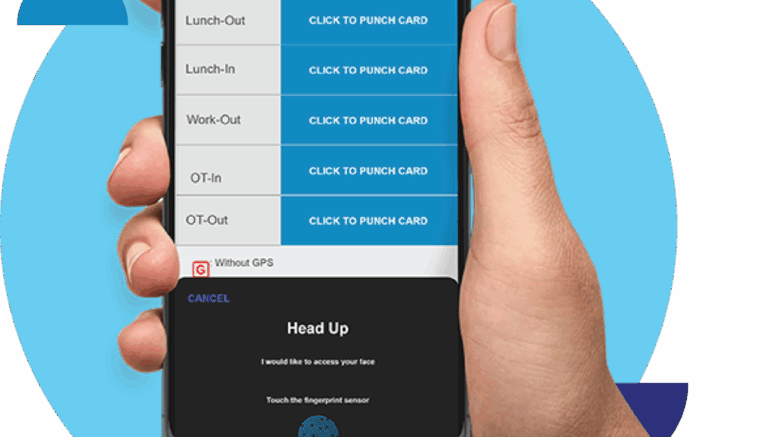
Managing a mobile or remote workforce without the right tools can lead to missed clock-ins, delayed leave approvals, and confusing paper-based claims. The SmartGoGo app solves these challenges by putting HR essentials directly in employees’ pockets, letting them clock in, apply for leave, and submit claims from anywhere in Singapore.
This article covers what the SmartGoGo app offers, why it matters for remote and mobile teams, and how to get started using it effectively.
What Is the SmartGoGo App?
The SmartGoGo app is a mobile workforce management tool designed for businesses with remote, mobile, or distributed employees. It allows staff to clock in and out using GPS or QR code verification, apply for leave, submit expense claims, and view their schedules, all from a smartphone.
For HR teams, the app connects directly to a central dashboard, giving real-time visibility into attendance and workforce activity without relying on physical time clocks or paper forms.
Why Remote Workforce Management Apps Matter
Companies with staff working across multiple sites, in the field, or on flexible schedules face unique HR challenges. Traditional attendance systems that rely on fixed terminals cannot capture data from employees who are constantly on the move, such as sales representatives, delivery staff, or maintenance crews.
Without a mobile solution, HR teams end up chasing paper timesheets, manually processing leave requests, and struggling to verify attendance accuracy. This slows down payroll processing and increases the risk of errors.
Common Challenges Without a Mobile HR App
- Inaccurate or delayed attendance records for mobile staff
- Slow, manual leave and claims approval processes
- Limited visibility into where employees are working
- Paper-based systems that are easy to lose or falsify
- Difficulty consolidating data across multiple work locations
How to Get Started with the SmartGoGo App
Downloading and setting up the SmartGoGo app is a quick process:
Step-by-Step Process
| Step | What to Do |
|---|---|
| 1. Download | Download the SmartGoGo app from the App Store or Google Play on your smartphone. |
| 2. Register | Log in using company-provided credentials linked to your HR profile. |
| 3. Clock in | Use GPS or QR code scanning to clock in and out at your work location. |
| 4. Manage requests | Submit leave applications and expense claims directly through the app. |
Once set up, employees can manage most day-to-day HR tasks without visiting the office or filling out paper forms.
Key Benefits of the SmartGoGo App
Key Benefits
- Anywhere access: Employees clock in, apply for leave, and submit claims from any location.
- Accurate attendance tracking: GPS and QR verification ensure reliable clock-in records for mobile staff.
- Faster approvals: Managers can approve leave and claims directly from their phones, speeding up turnaround.
- Reduced paperwork: Digital submissions eliminate the need for physical forms and manual filing.
- Real-time HR visibility: Dashboards give management live insight into workforce attendance and activity.
- Improved employee experience: Staff enjoy a simple, self-service way to manage their own HR needs.
Best Practices for Rolling Out a Mobile HR App
Best Practices
- Communicate the benefits: Explain to staff how the app simplifies their daily HR tasks before rollout.
- Provide simple onboarding: Offer a short guide or walkthrough for first-time app users.
- Set clear policies: Define expectations for clock-in accuracy and claims submission timelines.
- Monitor adoption: Track usage in the first few weeks to identify employees who need extra support.
- Integrate with payroll: Connect app data with payroll systems to reduce manual reconciliation.
Feature Comparison: Paper-Based HR vs SmartGoGo App
| Feature | Paper-Based Process | SmartGoGo App |
|---|---|---|
| Clock-in verification | Manual, unreliable | GPS/QR-based, accurate |
| Leave approval | Slow, paper forms | Instant, mobile approval |
| Data visibility | Delayed, manual compilation | Real-time dashboard |
| Accessibility | Office-bound | Anywhere, anytime |
Key Takeaways
- The SmartGoGo app gives remote and mobile employees an easy way to clock in, apply for leave, and submit claims.
- It solves common challenges of managing distributed teams, including inaccurate attendance and slow approvals.
- Real-time dashboards give HR teams live visibility into workforce activity.
- A clear rollout plan with employee communication ensures smooth adoption.
Frequently Asked Questions
1. Is the SmartGoGo app available for both iOS and Android?
Yes. The app can be downloaded from both the App Store and Google Play, making it accessible to employees on any smartphone.
2. Does the app work without internet access?
Some features may require an internet connection for real-time syncing, though many apps support offline data capture that syncs once reconnected.
3. Can managers approve leave and claims through the app too?
Yes. Managers can review, approve, or reject leave and claims requests directly within the app, speeding up the entire process.
4. Is employee data secure on the SmartGoGo app?
Yes. Employee data is encrypted and stored securely, with access limited to authorised HR personnel and the employees themselves.
Conclusion
The SmartGoGo app gives Singapore businesses a practical way to manage remote and mobile workforces without relying on outdated paper processes. From accurate clock-ins to fast leave approvals, the app streamlines everyday HR tasks for both employees and management. For companies with distributed teams, downloading and adopting SmartGoGo is a simple step toward more efficient workforce management.
Interested in this product? Click here to learn more: https://smartouch.com.sg/smartgogo/
Smart Touch technology pte ltd , www.smartouch.com.sg +65-63964767, sales@smartouch.com.sg , www.smartouch.com.my +607-3889903 sales@smartouch.com.my