Mobile Clock In App Singapore Installation Guide for Public-Sector Facilities
Introduction: Streamlining Time and Attendance in Singapore’s Public Sector
Public-sector facilities across Singapore—from government offices and healthcare institutions to educational centres and municipal buildings—face unique challenges when managing employee attendance and time tracking. Traditional manual systems, paper-based registers, and outdated clock-in methods consume valuable administrative resources, introduce human error, and create compliance difficulties.
Modern mobile clock-in solutions offer a practical alternative. They enable employees to record their attendance efficiently, provide real-time data to management, and support compliance with Singapore’s employment and labour regulations. For public-sector facilities, where accountability and transparency are paramount, implementing a reliable mobile clock-in app can significantly improve operational efficiency.
This guide walks you through the installation and implementation of a mobile clock-in app specifically tailored for public-sector facilities in Singapore, exploring the key considerations, benefits, and practical steps involved.
Why Public-Sector Facilities in Singapore Need Mobile Clock-In Solutions
Managing Large Workforces
Public-sector organisations often employ hundreds or thousands of staff across multiple locations. Managing attendance manually becomes increasingly impractical. A mobile clock-in app centralises all attendance data, making it easier for HR teams to monitor timekeeping across departments and locations in real time.
Ensuring Accountability and Transparency
Public-sector organisations are accountable to stakeholders, government bodies, and the public. Accurate attendance records demonstrate organisational integrity and support compliance with employment law. A digital mobile clock-in system creates an auditable, tamper-resistant record of when employees entered and left their workplaces.
Reducing Administrative Burden
Manual attendance processes consume hours of administrative time each month. Automated clock-in systems eliminate paper records, reduce data-entry errors, and free HR staff to focus on strategic initiatives rather than administrative tasks.
Supporting Flexible Work Arrangements
As many public-sector organisations adopt flexible working hours and hybrid arrangements, mobile clock-in apps allow employees to record attendance from various locations, providing flexibility while maintaining accurate records.
Key Considerations for Public-Sector Facilities
Security and Data Protection
Public-sector organisations handle sensitive employee data and must comply with Singapore’s Personal Data Protection Act (PDPA). Any mobile clock-in solution must include robust security measures such as encryption, secure authentication, and access controls. Before implementation, verify that your chosen solution meets data protection standards.
Integration with Existing Systems
Most public-sector facilities already use payroll systems, HR management platforms, or enterprise resource planning (ERP) software. Your mobile clock-in app should integrate smoothly with these existing systems to avoid duplicate data entry and maintain system coherence.
User-Friendly Design
Public-sector workforces are diverse, ranging from frontline staff to administrative personnel. A clock-in app must be intuitive and easy to use, requiring minimal training. It should work reliably across different devices and mobile platforms.
Reliability and Uptime
Critical public-sector functions depend on accurate timekeeping. The app should offer high availability and reliable performance, with minimal downtime that could disrupt attendance recording.
Compliance with Singapore Employment Law
Singapore’s Employment Act and other relevant legislation set requirements for working hours, overtime, and record-keeping. Any clock-in system should support compliance with these requirements. For the most current requirements, consult the Ministry of Manpower (MOM) or your legal advisers.
Installation Steps for a Mobile Clock-In App
Step 1: Assess Your Facility’s Requirements
Before installation, clearly define your facility’s needs. Consider the following:
- How many employees need to clock in daily?
- How many physical locations or buildings will use the app?
- What devices will employees use (smartphones, tablets, or both)?
- Do you need to track specific working areas or departments within your facility?
- What integration requirements do you have with your existing systems?
Consulting with key stakeholders—HR managers, IT teams, and frontline supervisors—ensures the solution meets genuine operational needs.
Step 2: Select the Right Mobile Clock-In Solution
Evaluate available solutions based on functionality, security, support, and cost. Look for features such as:
- Mobile app compatibility with iOS and Android
- Geolocation capability to verify clock-in location
- Real-time data synchronisation
- Automated reporting and analytics
- Integration with payroll and HR systems
- Offline functionality for areas with poor connectivity
Request demonstrations from vendors and speak with their existing public-sector clients if possible.
Step 3: Prepare Your IT Infrastructure
Ensure your IT infrastructure can support the mobile app. This includes:
- Reliable internet connectivity across all facility locations
- WiFi coverage in clock-in areas (if applicable)
- Secure network configuration and firewall rules
- Cloud storage or server capacity for data storage
- Backup and disaster recovery systems
Your IT team should review security protocols to ensure the system meets PDPA requirements and your organisation’s data protection standards.
Step 4: Configure System Settings and Access Control
Once the infrastructure is ready, configure the app with your organisation’s specific requirements:
- Set up user accounts and assign appropriate permission levels (e.g., employees, supervisors, administrators)
- Define clock-in locations and geofencing boundaries if using location-based features
- Configure working hours, shift patterns, and leave categories
- Integrate with existing payroll and HR systems
- Set up automated alerts for late arrivals, early departures, or unusual patterns
Step 5: Train Staff and End Users
Comprehensive training is critical for successful implementation. Conduct sessions covering:
- How to download and install the app on personal or facility-provided devices
- How to clock in and clock out correctly
- How to report issues or request support
- Privacy and data protection practices
- What managers and supervisors should do with attendance data
Provide written guides and create a help-desk process for user queries. Consider on-site training for employees unfamiliar with mobile technology.
Step 6: Pilot Testing
Before full rollout, run a pilot programme with a smaller group of employees or a single department. This allows you to identify technical issues, refine processes, and gather feedback before organisation-wide deployment.
Step 7: Full Rollout and Ongoing Management
Once pilot testing is complete and adjustments are made, proceed with full deployment. Establish ongoing management practices:
- Monitor system performance and troubleshoot technical issues promptly
- Review attendance data regularly for anomalies or trends
- Provide ongoing user support
- Update the system as your organisation’s needs evolve
- Conduct periodic training refreshers for new employees
Benefits of Mobile Clock-In Apps for Public-Sector Facilities
Increased Accuracy
Automated time recording eliminates manual entry errors and reduces discrepancies between recorded and actual attendance.
Improved Efficiency
Automated clock-in and data processing reduce administrative workload, allowing HR teams to focus on higher-value activities.
Better Compliance
Digital records provide clear, auditable evidence of attendance, supporting compliance with employment law and organisational policies.
Real-Time Visibility
Managers and supervisors can monitor attendance in real time, identifying issues quickly and making informed decisions about staffing and resource allocation.
Enhanced Employee Experience
A simple, mobile-first app provides convenience for employees, reducing friction in the clock-in process and supporting flexible working arrangements.
How SmartGogo Apps Can Support Your Public-Sector Facility
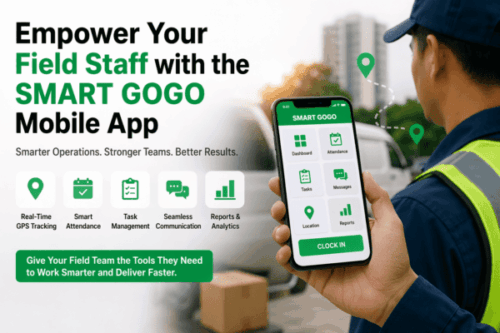
SmartGogo apps from Smart Touch Technology Singapore offers a comprehensive mobile clock-in solution designed to meet the needs of modern organisations, including public-sector facilities. The platform streamlines attendance management with an intuitive mobile interface, real-time data synchronisation, and integration capabilities.
By implementing SmartGogo apps, your facility can centralise attendance management, improve data accuracy, reduce administrative overhead, and maintain compliance with Singapore employment regulations. The solution supports your organisation’s need for accountability while providing employees with a convenient, user-friendly way to record their attendance.
Whether you’re managing a single facility or multiple locations, SmartGogo apps can be configured to match your specific operational requirements.
Conclusion
Installing a mobile clock-in app in your Singapore public-sector facility requires careful planning, appropriate infrastructure, and thorough user training. By following the steps outlined in this guide—assessing requirements, selecting the right solution, preparing your IT environment, configuring system settings, training staff, conducting pilot testing, and managing ongoing operations—you can successfully implement a modern attendance system that improves efficiency, ensures compliance, and enhances your organisation’s operational capability.
Mobile clock-in solutions are no longer optional extras; they are practical necessities for organisations seeking to operate efficiently and maintain accountability. With the right approach and tools, your public-sector facility can modernise its time and attendance management and unlock the benefits of digital automation.
Interested in this product? Click here to learn more: https://smartouch.com.sg/smartgogo/
Smart Touch technology pte ltd , www.smartouch.com.sg +65-63964767, sales@smartouch.com.sg , www.smartouch.com.my +607-3889903 sales@smartouch.com.my