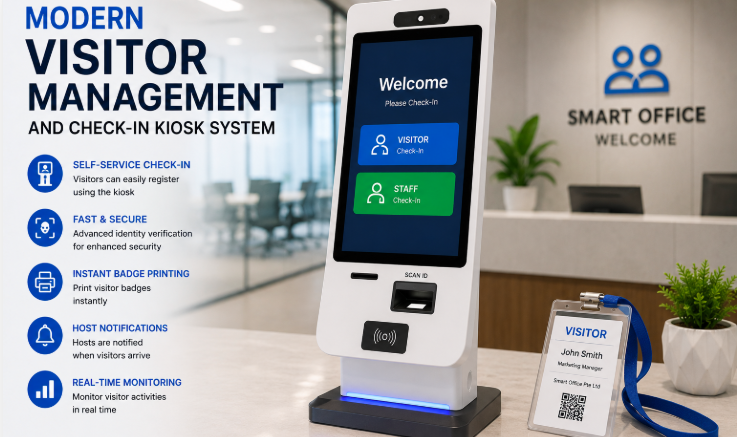
Managing visitors efficiently is becoming increasingly important for businesses in Singapore. Offices, factories, construction sites, warehouses, and commercial buildings may receive employees, contractors, delivery personnel, clients, and guests throughout the day. When visitor registration still depends on reception staff and paper logbooks, queues can form and important visitor information can be difficult to track.
A self-service visitor kiosk provides a more efficient alternative. Instead of waiting for reception staff to manually register every visitor, guests can complete the check-in process themselves using a touchscreen kiosk. Depending on the system, visitors can enter their details, scan a QR code or identification document, take a photo, notify their host, and receive a visitor badge.
For Singapore businesses looking to modernise front-desk operations without compromising security, here are the top five benefits of self-service visitor kiosks.
1. Faster Visitor Check-In
One of the biggest advantages of a self-service visitor kiosk is faster registration.
Traditional visitor registration often requires a guest to wait for reception staff to collect information, check the visitor’s appointment, contact the host, and complete the sign-in process. During busy periods, several visitors arriving at once can quickly create a queue.
A self-service kiosk allows visitors to complete much of this process independently.
Depending on the configuration, visitors can:
- Enter their personal details
- Scan a QR code from a pre-registration invitation
- Confirm their appointment
- Capture a visitor photo
- Notify their host
- Print a visitor badge
This reduces the amount of routine work handled by reception staff and allows visitors to move through the entrance more quickly.
For offices with frequent client meetings, factories receiving contractors, or construction sites with regular visitors, faster check-in can make a noticeable difference to daily operations.
2. Reduces Reception Workload
Reception teams often spend a significant amount of time handling repetitive visitor registration tasks.
A self-service kiosk automates many of these routine activities, allowing reception staff to focus on visitors who genuinely require assistance.
For example, instead of manually entering the details of every guest, reception staff can concentrate on:
- Handling special visitor requests
- Assisting first-time visitors
- Managing deliveries
- Supporting VIP guests
- Responding to security issues
- Coordinating meetings
This does not necessarily mean eliminating the reception function. Instead, the kiosk acts as an additional tool that allows staff to work more efficiently.
For businesses with limited front-desk resources, this can be particularly useful during peak arrival periods.
3. Improves Visitor Security
A visitor kiosk is more than a digital replacement for a sign-in book. When integrated with a visitor management system and access control, it can become part of the organisation’s wider security process.
Visitors can be required to provide specific information before completing registration. The system can also capture a visitor photograph and record the exact check-in time.
Once the visitor has been approved, the system can issue a temporary visitor credential, such as a printed badge, QR code, or other access credential depending on the deployment.
When integrated with access control, visitor permissions can also be limited according to the approved visit.
For example, a visitor may only be authorised to access:
- The reception area
- A specific meeting room
- A particular office floor
- A designated visitor zone
This provides greater control than a traditional paper visitor book, where signing in does not physically restrict where a visitor can go.
4. Creates Accurate Digital Visitor Records
Paper visitor books can become difficult to manage when an organisation receives hundreds or thousands of visitors over time.
Entries may be difficult to read, records can be misplaced, and searching for a particular visitor may require manually going through pages of information.
A digital visitor management system creates a centralised record of visitor activity.
Depending on the system configuration, records may include:
- Visitor name
- Company
- Host employee
- Check-in time
- Check-out time
- Visitor photograph
- Visit purpose
- Access activity
This makes it easier for security and facilities teams to search visitor records when required.
Digital records can also support internal reporting and incident investigations by providing a clearer history of who was registered on-site.
5. Provides a More Professional Visitor Experience
First impressions matter.
A visitor arriving at a modern office or business facility may expect the check-in process to be equally modern. Asking guests to write their details into a paper logbook can make the entrance feel outdated and inefficient.
A self-service kiosk provides a more streamlined experience.
Visitors can follow simple on-screen instructions to complete registration without needing to wait for someone at the reception desk.
The experience can be particularly useful for:
- Corporate offices
- Commercial buildings
- Factories
- Industrial facilities
- Construction sites
- Business parks
- Educational institutions
- Large organisations with multiple locations
For companies receiving customers, business partners, contractors, or other professional visitors, a smooth digital check-in process can also reinforce the organisation’s modern and technology-focused image.
Additional Benefits for Singapore Businesses
Beyond the five main advantages, organisations can also benefit from integrating a visitor kiosk with other workplace systems.
Host Notifications
Once a visitor completes registration, the system can notify the relevant host through supported communication channels.
This eliminates the need for reception staff to manually call employees whenever their visitors arrive.
Visitor Pre-Registration
Employees can pre-register expected visitors before their arrival.
The visitor can then receive a QR code or other registration information and complete the check-in process more quickly when they reach the premises.
This is especially useful for scheduled meetings, contractor visits, interviews, and events.
Visitor Badge Printing
A kiosk can be connected to a badge printer so that approved visitors receive a badge after completing registration.
The badge can display information such as the visitor’s name, photograph, host, or visit validity period, depending on the system configuration.
Multi-Site Management
Businesses operating multiple offices or facilities can benefit from centralised visitor management.
Instead of maintaining separate paper records at every location, management can use a central platform to monitor visitor activity across participating sites.
This can make standardising visitor policies and reporting much easier.
What to Look for in a Self-Service Visitor Kiosk
Not every visitor kiosk provides the same capabilities. Businesses should consider the following before selecting a system.
Easy-to-Use Interface
Visitors should be able to understand the registration process without extensive assistance.
A clear touchscreen interface with straightforward instructions helps reduce confusion and queues.
Visitor Management Integration
The kiosk should connect to a central visitor management platform so that visitor information is stored and managed digitally.
Host Notification
Automatic host notifications can significantly reduce reception workload and improve the visitor experience.
Access Control Integration
For higher-security environments, consider a system that can integrate with existing access control, turnstiles, swing barriers, or doors.
Badge Printing
If physical visitor identification is required, the kiosk should support visitor badge printing.
Reporting
Security and facilities teams should be able to retrieve visitor records and generate useful reports when required.
Data Protection
Visitor information is personal data, so businesses should carefully evaluate how the system stores, protects, retains, and deletes visitor information.
Self-Service Kiosk vs Traditional Visitor Registration
| Feature | Traditional Sign-In | Self-Service Visitor Kiosk |
|---|---|---|
| Registration | Manual | Digital |
| Reception workload | High | Reduced |
| Visitor records | Paper-based | Centralised digital records |
| Host notification | Manual | Automated |
| Visitor photo | Usually unavailable | Can be captured digitally |
| Badge printing | Manual | Automated |
| Reporting | Time-consuming | Digital and searchable |
| Access control integration | Limited | Available with compatible systems |
How to Successfully Deploy a Visitor Kiosk
Installing the kiosk is only one part of a successful visitor management project.
Businesses should first identify the main visitor types and registration requirements at the site.
For example, an office may primarily receive employees, clients, and interview candidates, while a factory may receive contractors, suppliers, delivery personnel, and auditors.
The visitor workflow should then be configured around these requirements.
A typical deployment can include:
1. Site assessment
Identify the best kiosk location, visitor flow, network requirements, and access points.
2. Visitor workflow design
Determine what information visitors need to provide and which visitors require host approval.
3. System integration
Connect the kiosk with visitor management, host notification, badge printing, and access control systems where required.
4. Staff configuration
Register employees and configure host notification rules.
5. Testing
Test different visitor scenarios, including pre-registered visitors, walk-ins, contractors, and visitors requiring assistance.
6. Staff and visitor onboarding
Provide basic instructions and clear signage so visitors understand how to use the kiosk.
Why Self-Service Visitor Kiosks Are Becoming More Important
Businesses are increasingly expected to balance security with convenience.
A visitor management system that creates too much friction can frustrate guests and reception teams. At the same time, a system that prioritises convenience without proper verification can create security weaknesses.
Self-service visitor kiosks provide a middle ground by automating routine registration while allowing organisations to maintain control over visitor approval and access.
When combined with access control, visitor management, and digital reporting, the kiosk becomes part of a broader workplace security ecosystem rather than simply replacing a paper sign-in book.
Smart Touch Technology Visitor Management System
Smart Touch Technology provides a visitor management solution designed to help Singapore businesses modernise visitor registration and site security.
The solution can support features such as:
- Self-service visitor kiosk registration
- Visitor pre-registration
- QR code check-in
- Visitor photo capture
- Host notifications
- Visitor badge printing
- Digital visitor records
- Visitor reporting
- Access control integration
- Turnstile and barrier integration
The system can be configured for different environments, including corporate offices, factories, construction sites, commercial buildings, and other facilities with regular visitor traffic.
For organisations managing multiple locations, centralised visitor management can also provide greater visibility over visitor activity across participating sites.
Frequently Asked Questions
1. What is a self-service visitor kiosk?
A self-service visitor kiosk is a touchscreen device that allows guests to register themselves when they arrive at a workplace or facility without requiring reception staff to manually enter all visitor information.
2. Can visitors pre-register before arriving?
Yes. Depending on the system configuration, hosts can pre-register visitors and provide them with a QR code or other registration information before their visit.
3. Can the kiosk notify the host automatically?
Yes. A visitor management system can be configured to notify the host when an expected or approved visitor completes check-in.
4. Can a visitor kiosk control building access?
A kiosk itself does not necessarily control physical access. However, when integrated with compatible access control systems, visitor credentials can be used to provide controlled access to approved areas.
5. Can visitor badges be printed automatically?
Yes. A compatible kiosk can connect to a badge printer and issue visitor identification after registration.
6. Is a visitor kiosk suitable for small businesses?
Yes. Visitor kiosks can be useful for both small offices and large facilities. The appropriate configuration depends on visitor volume, security requirements, and the organisation’s existing infrastructure.
7. Can the system support multiple locations?
Yes. A centralised visitor management platform can be configured to manage visitor activity across multiple participating sites.
Conclusion
Self-service visitor kiosks offer Singapore businesses a practical way to modernise visitor registration without making the process complicated for guests or reception teams.
The five key benefits are clear: faster check-in, reduced reception workload, stronger visitor security, accurate digital records, and a more professional visitor experience.
When integrated with visitor management software, host notifications, badge printing, and access control, a self-service kiosk becomes more than a digital sign-in screen. It becomes an important part of a modern workplace security and visitor management strategy.
For Singapore businesses looking to replace paper visitor books with a more efficient and secure solution, Smart Touch Technology’s visitor management system provides a scalable option for managing visitors across offices, factories, construction sites, and other facilities.
Explore the Smart Touch Visitor Management System:
https://smartouch.com.sg/vms-visitor-management-system/
Smart Touch Technology Pte Ltd
Singapore
www.smartouch.com.sg
+65-63964767
sales@smartouch.com.sg
Malaysia
www.smartouch.com.my
+607-3889903
sales@smartouch.com.my