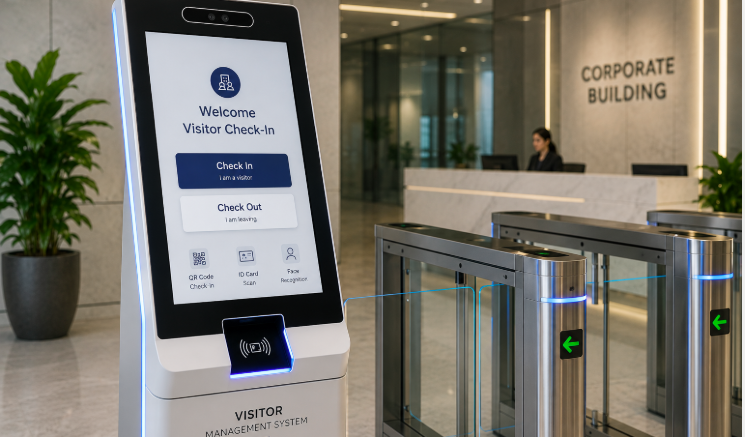
The moment a visitor walks into your office or facility sets the tone for their entire experience — and increasingly, it is also a critical security checkpoint. A well-designed visitor management kiosk replaces the old sign-in book with a fast, professional, and secure check-in process. But not all kiosks are built the same. Here are the seven features that separate a genuinely effective Singapore visitor kiosk from a basic digital sign-in screen.
1. Fast, Self-Service Check-In
A good visitor kiosk should let guests check themselves in within seconds — entering their name, company, and host details through an intuitive touchscreen interface without needing staff assistance for every visitor.
Why It Matters
Long queues at reception create a poor first impression and pull front-desk staff away from other responsibilities. Self-service check-in keeps the lobby moving, even during busy periods.
2. Host Notification
Once a visitor checks in, the system should instantly notify their host via email, SMS, or app notification, eliminating the need for reception to manually call or message employees.
3. ID Verification and Photo Capture
For security-conscious environments, the kiosk should support ID scanning or photo capture at check-in, creating a verifiable record of every visitor who enters the premises.
4. Digital Visitor Badge Printing
Printed or digital badges with the visitor’s name, host, and visit purpose make it easy for staff to identify authorised guests at a glance, improving on-site security.
5. Pre-Registration and QR Code Check-In
The best systems allow hosts to pre-register expected visitors, generating a QR code the guest can scan on arrival for an even faster, touch-minimal check-in process.
6. NDA and Compliance Document Handling
For facilities that require visitors to sign NDAs, safety briefings, or compliance declarations, the kiosk should support digital document signing as part of the check-in flow.
7. Real-Time Reporting and Evacuation Lists
In an emergency, knowing exactly who is on-site is critical. A capable visitor kiosk maintains a real-time log of all checked-in guests, ready to generate an evacuation list instantly.
Why Singapore Businesses Are Upgrading to Visitor Kiosks
- Professional first impression: A sleek digital kiosk reflects well on your brand from the moment a guest arrives.
- Improved security: Digital records replace easily falsified paper logbooks.
- Reduced admin burden: Reception staff spend less time manually managing visitor sign-ins.
- PDPA-aligned data handling: Digital systems can be configured with data retention and access controls that support compliance with Singapore’s Personal Data Protection Act.
Feature Comparison: Paper Logbook vs. Digital Visitor Kiosk
| Factor | Paper Logbook | Digital Visitor Kiosk |
|---|---|---|
| Check-in speed | Slow, manual entry | Fast, self-service |
| Host notification | Manual phone call | Instant automated alert |
| Data security | Visible to all visitors | Encrypted, access-controlled |
| Emergency evacuation list | Manual headcount | Instant digital report |
Step-by-Step: Choosing the Right Visitor Kiosk for Your Office
- Assess your visitor volume to determine how many kiosks and how much throughput capacity you need.
- Identify security requirements, such as ID verification, NDA signing, or badge printing.
- Check integration needs with existing access control, host notification, or building management systems.
- Evaluate ease of use for both visitors and reception staff during a trial period.
- Confirm data protection features align with your organisation’s PDPA compliance requirements.
Best Practices for Visitor Management
- Regularly review and purge visitor data in line with your data retention policy.
- Train reception staff to assist visitors unfamiliar with self-service kiosks.
- Test host notification reliability periodically to ensure alerts are not missed.
- Use pre-registration for expected guests to speed up high-traffic periods like conferences or events.
Key Takeaways
- An effective visitor kiosk combines speed, security, and a professional guest experience.
- Host notifications and digital badges improve both convenience and on-site safety.
- Real-time reporting supports emergency preparedness and evacuation planning.
- Choosing the right kiosk depends on your visitor volume, security needs, and integration requirements.
Conclusion
A modern visitor management kiosk does far more than replace a paper logbook — it strengthens security, improves the guest experience, and gives your organisation real-time visibility over everyone on-site. By prioritising the seven features outlined above, from fast self-service check-in to real-time evacuation reporting, Singapore businesses can turn their reception area into a genuine asset for both security and brand impression.
Frequently Asked Questions
What is a visitor management kiosk?
A visitor management kiosk is a self-service touchscreen device that allows guests to check in, notify their host, and receive a visitor badge without manual intervention from reception staff.
Can visitor kiosks integrate with access control systems?
Yes, many visitor kiosks integrate with access control and building management systems to grant temporary, time-limited access to checked-in visitors.
Is visitor data stored securely?
Reputable visitor kiosk systems encrypt data and provide role-based access control, along with configurable data retention settings to support PDPA compliance.
Do visitor kiosks support pre-registered guests?
Yes, hosts can pre-register expected visitors, generating a QR code that speeds up check-in when the guest arrives.
How does a visitor kiosk help during emergencies?
The system maintains a real-time log of everyone checked in, allowing staff to generate an accurate evacuation list instantly during an emergency.
Explore full product details by clicking here: https://smartouch.com.sg/vms-visitor-management-system/
Smart Touch technology pte ltd , www.smartouch.com.sg +65-63964767, sales@smartouch.com.sg , www.smartouch.com.my +607-3889903 sales@smartouch.com.my