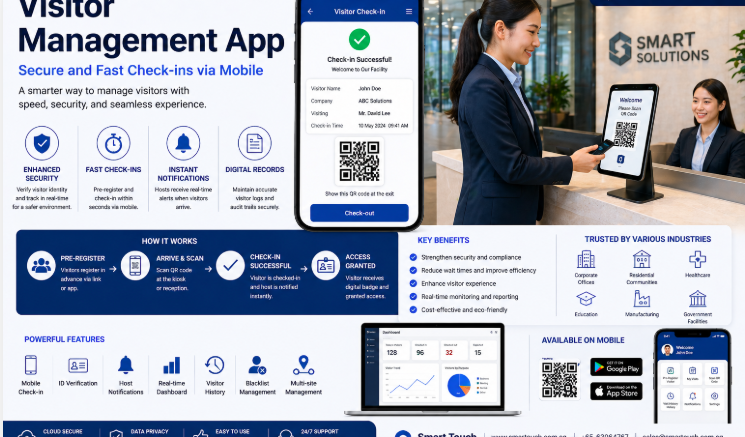
Visitor management is often the first impression a corporate building makes on guests, contractors, and clients. Yet many offices still rely on paper sign-in sheets or manual ID checks at the front desk. A Smart Visitor Tracking Software replaces these outdated processes with a fast, secure, and professional check-in experience while giving building management full visibility into who is on-site at any given time. This article covers what visitor tracking software does, why Singapore corporate buildings are adopting it, and how to choose the right solution.
What Is Smart Visitor Tracking Software?
Visitor tracking software digitises the entire guest check-in process, from pre-registration to badge printing and host notification. Instead of writing their name on a logbook, visitors check in using a self-service kiosk, QR code, or mobile app, and the system automatically verifies their identity, notifies the host, and logs their entry and exit times.
For corporate buildings with multiple tenants, high visitor volumes, or strict security requirements, this creates a more professional experience while strengthening building security and compliance records.
Why Singapore Corporate Buildings Are Upgrading Visitor Management
As office buildings in Singapore modernise their front-of-house operations, visitor management has become a key focus area for both security and guest experience reasons.
Common Problems with Manual Visitor Sign-In
- Illegible handwriting on paper logs makes records difficult to search or audit.
- No real-time visibility into who is currently in the building.
- Long queues at reception during peak visiting hours or large events.
- Manual host notification causes delays in greeting visitors.
- Difficulty producing accurate visitor records during security incidents or audits.
Key Features of a Visitor Tracking System
| Feature | Description |
|---|---|
| Self-service check-in | Visitors register via kiosk, QR code, or mobile link without staff assistance |
| Pre-registration | Hosts can register expected visitors in advance for faster check-in on arrival |
| Instant host notification | Automatically alerts the host by SMS or email when their visitor arrives |
| Badge printing | Prints a visitor badge with photo, name, and host details for easy identification |
| Digital visitor logs | Maintains a searchable, exportable record of every visitor’s entry and exit time |
| Access control integration | Can link with turnstiles or door access systems to restrict visitor movement |
Key Benefits for Corporate Buildings
- Improved first impressions — a fast, modern check-in process reflects well on the building and its tenants.
- Stronger security — accurate, real-time visitor data supports faster response during emergencies or investigations.
- Reduced front-desk workload — self-service check-in frees up reception staff for other tasks.
- Better compliance — digital records are easier to retrieve for audits or regulatory requirements.
- Scalability across tenants — multi-tenant buildings can manage different companies’ visitors from one platform.
How Visitor Tracking Software Works
1. Pre-Registration (Optional)
Hosts can register visitor details in advance, including name, company, and visit purpose.
2. Check-In
On arrival, the visitor checks in via a kiosk, QR code, or receptionist-assisted terminal.
3. Verification
The system verifies the visitor’s details and, where required, captures a photo or ID scan.
4. Host Notification
The host receives an automatic notification that their visitor has arrived.
5. Badge Issuance
A printed or digital badge is issued, often with time-limited access permissions.
6. Check-Out and Reporting
Visitors check out on departure, and the system logs the full visit duration for reporting.
Paper Logbook vs Digital Visitor Tracking
| Factor | Paper Logbook | Digital Visitor Tracking |
|---|---|---|
| Check-in speed | Slow, especially during peak periods | Fast, self-service via kiosk or QR code |
| Record accuracy | Prone to illegible or incomplete entries | Consistent, structured digital records |
| Searchability | Manual, time-consuming to search | Instantly searchable and exportable |
| Host notification | Manual phone call or walk-over | Automatic SMS or email alert |
| Security integration | None | Can link with access control systems |
This comparison shows why more corporate buildings are retiring the paper logbook in favour of a fully digital check-in experience.
Best Practices for Implementing Visitor Management
Map Out Your Visitor Journey First
Understand how visitors currently move through your building before configuring kiosk placement and check-in steps.
Integrate with Existing Access Control
Where possible, link the visitor system with turnstiles or door access hardware to enforce visitor-only access zones.
Prepare for Peak Periods
Ensure enough kiosks or check-in points are available during high-traffic times such as major events or conferences.
Train Reception Staff on Exceptions
Have a clear process for visitors who cannot self-check-in, such as those without smartphones or with accessibility needs.
Key Takeaways
- Smart visitor tracking software replaces manual sign-in sheets with a fast, digital check-in process.
- Corporate buildings benefit from stronger security, better compliance, and reduced front-desk workload.
- Core features include pre-registration, host notification, badge printing, and digital logs.
- Integration with access control adds an extra layer of building security.
- Planning the visitor journey and peak-time capacity helps ensure a smooth rollout.
Frequently Asked Questions
1. Can visitors pre-register before arriving at the building?
Yes. Hosts can pre-register visitor details in advance, allowing for a faster check-in process when the visitor arrives.
2. Does the system notify hosts automatically when a visitor checks in?
Yes. Most visitor tracking systems send an instant SMS or email notification to the host as soon as their visitor completes check-in.
3. Can visitor tracking software work across multiple tenants in one building?
Yes. Multi-tenant buildings can configure the system so each tenant company manages its own visitors and hosts within a shared platform.
4. Is visitor data stored securely?
Reputable visitor management systems store data with appropriate access controls, and businesses should review data retention and security practices with their provider.
5. Can the system integrate with door access or turnstile systems?
Yes. Many visitor tracking systems can integrate with access control hardware to restrict visitor movement to approved areas only.
6. What happens if a visitor forgets to check out?
Most systems allow administrators to manually close out a visit or set automatic check-out rules after a defined time period to keep records accurate.
Conclusion
A Smart Visitor Tracking Software solution turns a routine front-desk task into a streamlined, secure, and professional experience for every guest who walks through your corporate building. By replacing paper logs with digital check-in, host notifications, and searchable visitor records, building management gains better security oversight while making a stronger first impression on clients and partners. As Singapore’s corporate buildings continue to modernise, visitor tracking software is becoming a standard part of building operations.
Explore full product details by clicking here: https://smartouch.com.sg/vms-visitor-management-system/
Smart Touch technology pte ltd , www.smartouch.com.sg +65-63964767, sales@smartouch.com.sg , www.smartouch.com.my +607-3889903 sales@smartouch.com.my